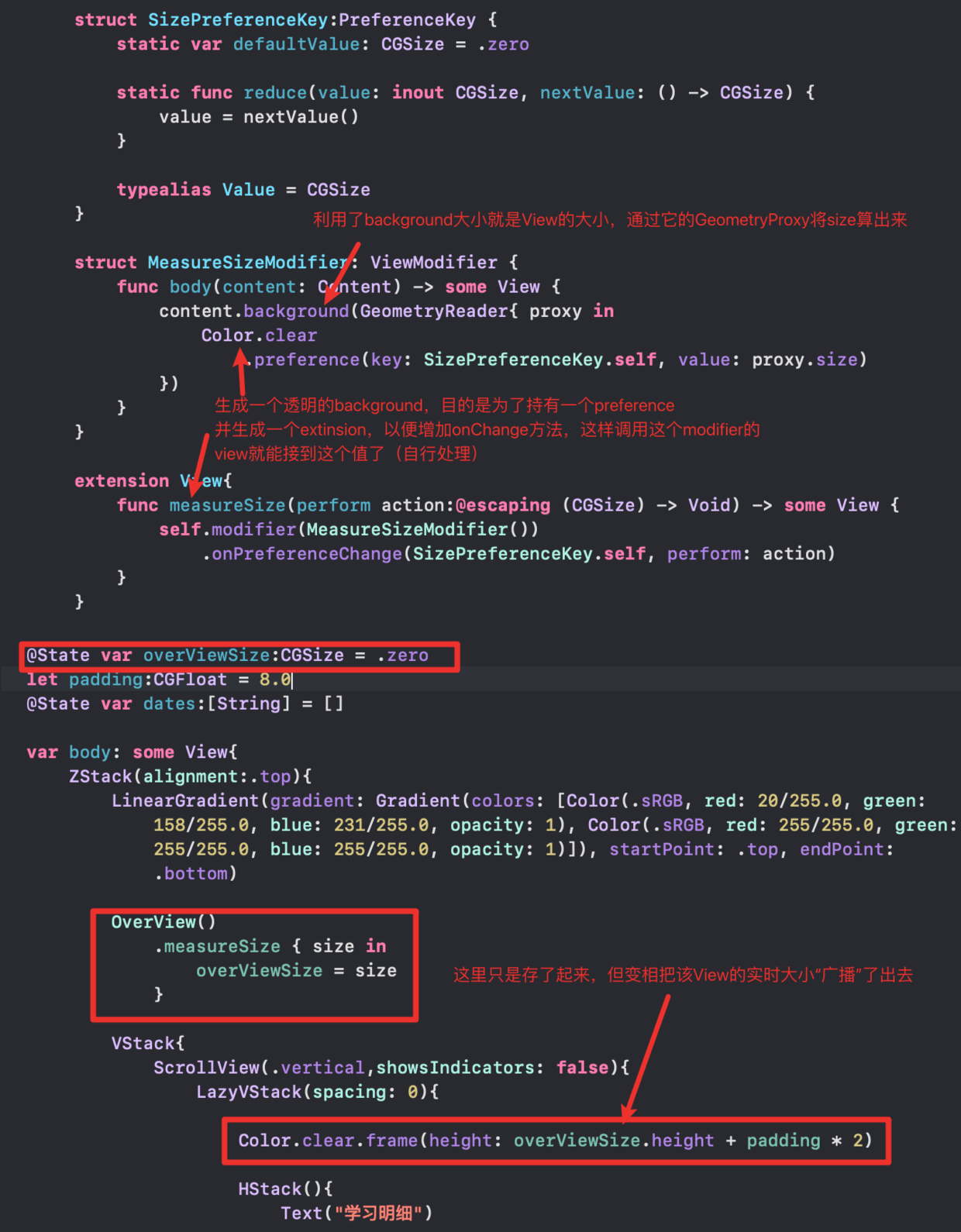
* see more [https://swiftwithmajid.com/2020/01/15/the-magic-of-view-preferences-in-swiftui/](https://swiftwithmajid.com/2020/01/15/the-magic-of-view-preferences-in-swiftui/)
This protocol gets/puts the contents of a document from/to a file. 即提供你的document读到文件系统的能力。
// create from a fileinit(configuration:ReadConfiguration)throws{ifletdata=configuration.file.regularFileContents{// init yourself from data}else{throwCocoaError(.fileReadCorruptFile)}}// writefuncfileWrapper(configuration:WriteConfiguration)throws->FileWrapper{FileWrapper(regularFileWithContents:/*my data*/)}
ReferenceFileDocument
几乎和FileDocument一致
继承自ObservableObject -> ViewModel only
唯一的区别是通过后台线程的一个snapshot来写入
// 先snapshotfuncsnapshot(contentType:UTType)throws->Snapshot{return// my data or something}// then writefuncfileWrapper(snapshot:Snapshot,configuration:WriteConfiguration)throws->FileWrapper{FileWrapper(regularFileWithContents:/* snapshpt converted to a Data */)}
Property List支持String, Int, Bool, floating point, Date, Data, Array or Dictionary
任何其它类型需要转成Property List
Codable converts structs into Data objects (and Data is a Property List).
letdefaults=UserDefaults.standarddefaults.set(object,forKey:“SomeKey”)// object must be a Property Listdefaults.setDouble(37.5,forKey:“MyDouble”)// retriveleti:Int=defaults.integer(forKey:“MyInteger”)letb:Data=defaults.data(forKey:“MyData”)letu:URL=defaults.url(forKey:“MyURL”)letstrings:[String]=defaults.stringArray(forKey:“MyString”)// etc.// Retrieving Arrays of anything but String is more complicated ...leta=defaults.array(forKey:“MyArray”)// will return Array<Any>// 最好用Codable的data(forKey:)替代
Core Data
SwiftUI进行的集成:
创建的对象是ObservableObjects
一个property wrapper @FetchRequest
管理对象(context)是NSManagedObjectContext
context通过@Environment传入
demo:
@Environnment(\.managedObjectContext)varcontextletflight=Flight(context:context)flight.aircraft=“B737”// etc.letksjc=Airport(context:context)ksjc.icao=“KSJC”// etc.flight.origin=ksjc// this would add flight to ksjc.flightsFrom too try? context.save()letrequest=NSFetchRequest<Flight>(entityName:“Flight”)request.predicate=NSPredicate(format:“arrival<%@andorigin=%@“,Date(),ksjc)request.sortDescriptors=[NSSortDescriptor(key:“ident”,ascending:true)]letflights=try?context.fetch(request)// past KSJC flights sorted by ident// flights is nil if fetch failed, [] if no such flights, otherwise [Flight]
@FetchRequest(entity:sortDescriptors:predicate:)varflights:FetchedResults<Flight>@FetchRequest(fetchRequest:)varairports:FetchedResults<Airport>// flights and airports will continuously update as the database changes. ForEach(flights){flightin// UI for a flight built using flight }// bi-binding_flights=FetchRequest(...)
Cloud Kit
上个demo吧
letdb=CKContainer.default.public/shared/privateCloudDatabase// Record理解为Tablelettweet=CKRecord(“Tweet”)// 索引理解为Fieldtweet[“text”]=“140charactersofpurejoy”lettweeter=CKRecord(“TwitterUser”)tweet[“tweeter”]=CKReference(record:tweeter,action:.deleteSelf)db.save(tweet){(savedRecord:CKRecord?,error:NSError?)->Voidiniferror==nil{// hooray!}elseiferror?.errorCode==CKErrorCode.NotAuthenticated.rawValue{// tell user he or she has to be logged in to iCloud for this to work!}else{// report other errors (there are 29 different CKErrorCodes!) }}// Query// 类似core data, 构造predict, request(就是query)即可letpredicate=NSPredicate(format:“textcontains%@“,searchString)letquery=CKQuery(recordType:“Tweet”,predicate:predicate)db.perform(query){(records:[CKRecord]?,error:NSError?)iniferror==nil{// records will be an array of matching CKRecords}elseiferror?.errorCode==CKErrorCode.NotAuthenticated.rawValue{// tell user he or she has to be logged in to iCloud for this to work!}else{// report other errors (there are 29 different CKErrorCodes!) }}
One of the coolest features of Cloud Kit is its ability to send push notifications on changes. All you do is register an NSPredicate and whenever the database changes to match it,
File System
Sandbox包含:
Application directory — Your executable, .jpgs, etc.; not writeable.
Documents directory — Permanent storage created by and always visible to the user.
Application Support directory — Permanent storage not seen directly by the user.
Caches directory — Store temporary files here (this is not backed up).
Other directories (see documentation)
...
leturl:URL=FileManager.default.url(fordirectory:FileManager.SearchPathDirectory.documentDirectory,// for example indomainMask:.userDomainMask// always .userDomainMask on iOSappropriateFor:nil,// only meaningful for “replace” file operationscreate:true// whether to create the system directory if it doesn’t already exist)
// URLfuncappendingPathComponent(String)->URLfuncappendingPathExtension(String)->URL// e.g. “jpg”varisFileURL:Bool// is this a file URL (whether file exists or not) or something else? funcresourceValues(forkeys:[URLResourceKey])throws->[URLResourceKey:Any]?// Example keys: .creationDateKey, .isDirectoryKey, .fileSizeKey// Data// retrive binary data// option almost always []init(contentsOf:URL,options:Data.ReadingOptions)throws// write// The options can be things like .atomic (write to tmp file, then swap) or .withoutOverwriting.funcwrite(tourl:URL,options:Data.WritingOptions)throws->Bool// FileManagerfileExists(atPath:String)->Bool// Can also create and enumerate directories; move, copy, delete files; etc.
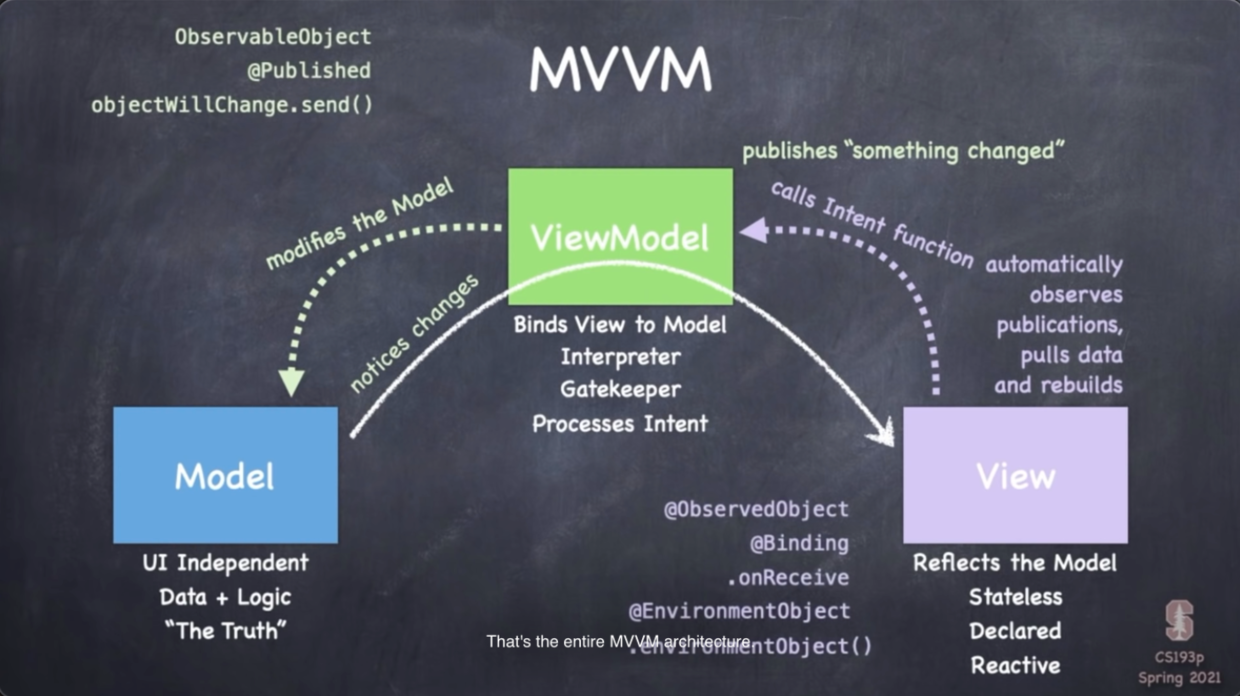
Causing a View to redraw when a published change is detected (@ObservedObject)
即能够分配到堆上,能够通知状态变化和能重绘等,可以理解为语法糖。
@PublishedvaremojiArt:EmojiArt=EmojiArt()// ... is really just this struct ...structPublished{varwrappedValue:EmojiArtvarprojectedValue:Publisher<EmojiArt,Never>// i.e. $}// `projected value`的类型取决于wrapper自己,比如本例就是一个`Publisher`// 我理解为一个属性和一个广播器// ... and Swift (approximately) makes these vars available to you ...var_emojiArt:Published=Published(wrappedValue:EmojiArt())varemojiArt:EmojiArt{get{_emojiArt.wrappedValue}set{_emojiArt.wrappedValue=newValue}}
把get,set直接通过$emojiArt(即projectedValue)来使用
当一个Published值发生变化:
It publishes the change through its projectedValue ($emojiArt) which is a Publisher.
It also invokes objectWillChange.send() in its enclosing ObservableObject.
The wrappedValue is: anything that implements the ObservableObject protocol (ViewModels).
What it does:
invalidates the View when wrappedValue does objectWillChange.send().
Projected value (i.e. $): a Binding (to the vars of the wrappedValue (a ViewModel)).
@StateObject V.S. @State
一个类型是ObservableObjects, 一个是value type
@StateObject V.S. @ObservedObject
@StateObject is a "source of truth",也就是说可以直接赋值:@StateObject var foo = SomeObservableObject()
能用在View, APP, Scene等场景
如果用在View里,生命周期与View一致
@mainstructEmojiArtApp:App{// stateObject, source of truth// defined in the app@StateObjectvarpaletteStore=PaletteStore(named:"default")varbody:someScene{DocumentGroup(newDocument:{EmojiArtDocument()}){configinEmojiArtDocumentView(document:config.document).environmentObject(paletteStore)// passed by environment}}}
@Binding
The wrappedValue is: a value that is bound to something else.
What it does:
gets/sets the value of the wrappedValue from some other source.
when the bound-to value changes, it invalidates the View.
Form表单典型应用场景,有UI变化的控件
手势过程中的State, 或drag时是否targted
模态窗口的状态
分割view后共享状态
总之,数据源只有一个(source of the truth)的场景,就不需要用两个@State而用@Binding,
Projected value (i.e. $): a Binding (self; i.e. the Binding itself)
The wrappedValue is: ObservableObject obtained via .environmentObject() sent to the View.
What it does: invalidates the View when wrappedValue does objectWillChange.send().
Projected value (i.e. $): a Binding (to the vars of the wrappedValue (a ViewModel)).
与@ObservedObject用法稍有点不同,有单独的赋值接口:
letmyView=MyView().environmentObject(theViewModel)// 而@ObservedObject是一个普通的属性letmyView=MyView(viewModel:theViewModel)// Inside the View ...@EnvironmentObjectvarviewModel:ViewModelClass// ... vs ...@ObservedObjectvarviewModel:ViewModelClass
visible to all views in your body (except modallay presented ones)
Is a color-specifier, e.g., .foregroundColor(Color.green).
Can also act like a ShapeStyle, e.g., .fill(Color.blue).
Can also act like a View, e.g., Color.white can appear wherever a View can appear.(可以当作view)
UIColor:
Is used to manipulate colors.(主打操控)
Also has many more built-in colors than Color, including “system-related” colors.(颜色更多)
Can be interrogated and can convert between color spaces.
For example, you can get the RGBA values from a UIColor.
Once you have desired UIColor, employ Color(uiColor:) to use it in one of the roles above.
CGColor:
The fundamental color representation in the Core Graphics drawing system
color.cgColor
Image V.S. UIImage
Image:
Primarily serves as a View.(主要功能是View)
Is not a type for vars that hold an image (i.e. a jpeg or gif or some such). That’s UIImage.
Access images in your Assets.xcassets (in Xcode) by name using Image(_ name: String).
Also, many, many system images available via Image(systemName:).
You can control the size of system images with .imageScale() View modifier.
System images also are affected by the .font modifier.
System images are also very useful as masks (for gradients, for example).
UIImage
Is the type for actually creating/manipulating images and storing in vars.
Very powerful representation of an image.
Multiple file formats, transformation primitives, animated images, etc.
Once you have the UIImage you want, use Image(uiImage:) to display it.
Multithreading
多线程其实并不是同时运行,而是前后台非常快速地切换
Queue只是有顺序执行的代码,封装了threading的应用
这些“代码”用closure来传递
main queue唯一能操作UI的线程
主线程是单线程,所以不能执行异步代码
background queues执行任意:long-lived, non-UI tasks
可以并行运行(running in parallel) -> even with main UI queue
可以手动设置优先级,服务质量(QoS)等
优先级永远不可能超过main queue
base API: GCD (Grand Central Dispatch)
getting access to a queue
plopping a block of code on a queue
A: Creating a Queue
There are numerous ways to create a queue, but we’re only going to look at two ...
DispatchQueue.main// the queue where all UI code must be postedDispatchQueue.global(qos:QoS)// a non-UI queue with a certain quality of service qos (quality of service) is one of the following ....userInteractive// do this fast, the UI depends on it!.userInitiated// the user just asked to do this, so do it now.utility// this needs to happen, but the user didn’t just ask for it.background// maintenance tasks (cleanups, etc.)
B: Plopping a Closure onto a Queue
There are two basic ways to add a closure to a queue ...
letqueue=DispatchQueue.main//orletqueue=DispatchQueue.global(qos:)queue.async{/* code to execute on queue */}queue.sync{/* code to execute on queue */}
主线程里永远不要.sync, 那样会阻塞UI
DispatchQueue(global:.userInitiated).async{// 耗时代码// 不阻塞UI,也不能更新UI// 到主线程去更新UIDispatchQueue.main.async{// UI code can go here! we’re on the main queue! }}
Gestures
手势是iOS里的一等公民
// recognizemyView.gesture(theGesture)// theGesture must implement the Gesture protocol// createvartheGesture:someGesture{returnTapGesture(count:2)// double tap}// discrete gesturesvartheGesture:someGesture{returnTapGesture(count:2).onEnded{/* do something */}}// 其实就是:functheGesture()->someGesture{tapGesture(count:2)}// “convenience versions”myView.onTapGesture(count:Int){/* do something */}myView.onLongPressGesture(...){/* do something */}// non-discrete gesturesvartheGesture:someGesture{DragGesture(...).onEnded{valuein/* do something */}
non-discrete手势里传递的value是一个state:
For a DragGesture, it’s a struct with things like the start and end location of the fingers.
For a MagnificationGesture it’s the scale of the magnification (how far the fingers spread out).
For a RotationGesture it’s the Angle of the rotation (like the fingers were turning a dial).
还可以跟踪一个state: @GestureState var myGestureState: MyGestureStateType = <starting value>
唯一可以更新这个myGestureState的机会:
vartheGesture:someGesture{DragGesture(...).updating($myGestureState){value,myGestureState,transactioninmyGestureState=/* usually something related to value */}.onEnded{valuein/* do something */}}
注意$的用法
如果不需要去计算一个gestureState传出去的话,有个updating用简版:
.onChanged{valuein/* do something with value (which is the state of the fingers) */}
withAnimation(.linear(duration:2)){// do something that will cause ViewModifier/Shape arguments to changesomewhere}
It will appear in closures like .onTapGesture.
显式动画不会覆盖掉隐式动画
很少有处理用户手势而不包.withAnimation的
Transition
转场,主要用于view的出现和消失
一对ViewModifier,一个before, 一个after
ZStack{ifisFaceUp{RoundedRectangle()// default .transition is .opacity Text(“👻”).transition(.scale)}else{RoundedRectangle(cornerRadius:10).transition(.identity)}}
Unlike .animation(), .transition() does not get redistributed to a container’s content Views. So putting .transition() on the ZStack above only works if the entire ZStack came/went.
(Group and ForEach do distribute .transition() to their content Views, however.)
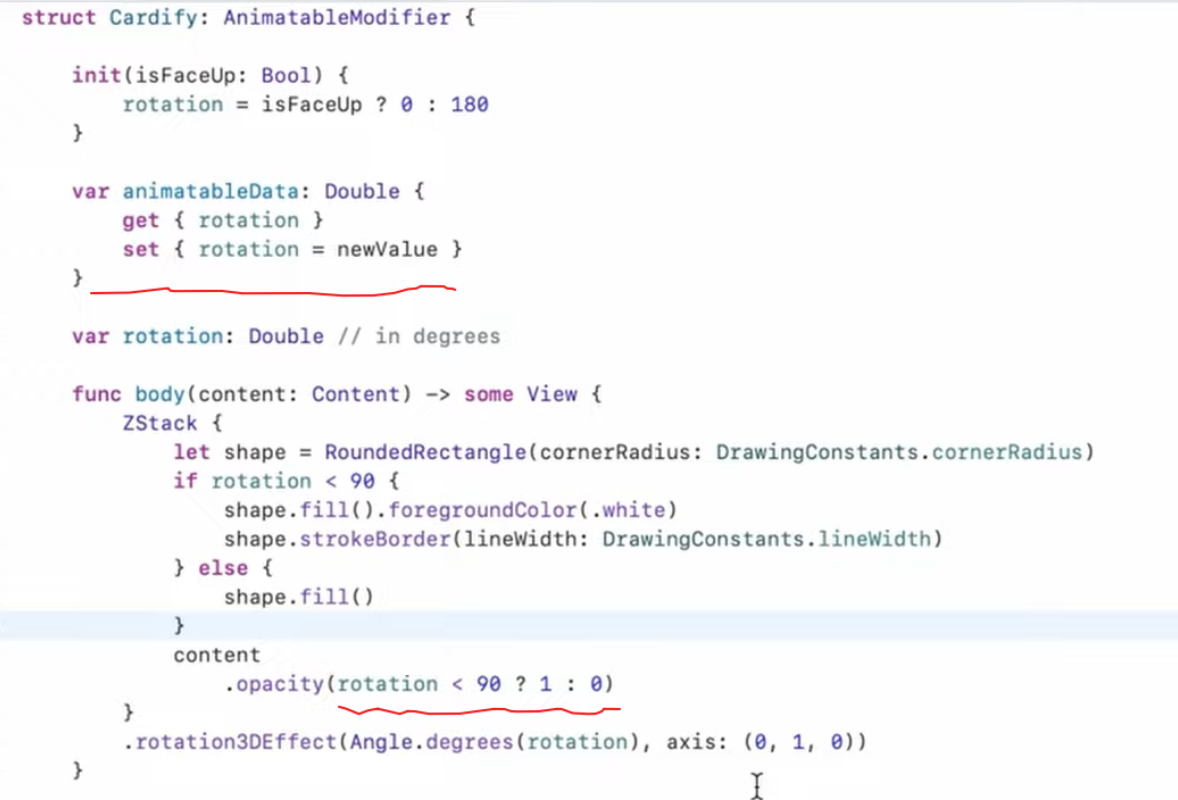
.aspectRatio(2/3) is likely something like .modifier(AspectModifier(2/3)) AspectModifier can be anything that conforms to the ViewModifier protocol ...
它只有一个body方法:
protocolViewModifier{associatedtypeContent// this is a protocol’s version of a“don’t care” funcbody(content:Content)->someView{returnsomeViewthatrepresentsamodificationofcontent}}