walker's code blog

coder, reader

几种教材里求解Ax=0笔记

如果一个矩阵化简为

$$ A= \left[ \begin{array}{cccc|c} 1&2&2&2&0 \\ 0&0&1&2&0 \\ 0&0&0&0&0 \end{array} \right] \tag{0} $$

求解$\bf{A}\it\vec{x}=0$

对比在不同教材中的解题思路。

可汗学院解法

先继续化简为Reduced Row Echelon Form (RREF)

$$ \left[ \begin{array}{cccc|c} 1&2&0&-2&0 \\ 0&0&1&2&0 \\ 0&0&0&0&0 \end{array} \right] \tag{1. 1} $$

还原为方程组:

$$ \begin{cases} x_1=-2x_2+2x_4 \\ x_3=-2x_4\\ \end{cases} \tag{1.2} $$

用$x_2$和$x_4$来表示$x_1$和$x_3$,填满矩阵相应位置即可得解:

$$ \left[\begin{smallmatrix} x_1\\x_2\\x_3\\x_4 \end{smallmatrix}\right]= x_2 \left[\begin{smallmatrix} -2\\1\\0\\0 \end{smallmatrix}\right] + x_4 \left[\begin{smallmatrix} 2\\0\\-2\\1 \end{smallmatrix}\right] \tag{1.3} $$

如果不是太直观的话,其实就是把以下方程写成了矩阵的形式:

$$ \begin{cases} x_1=-2x_2+2x_4 \\ x_2=x_2\\ x_3=-2x_4\\ x_4=x_4 \end{cases}\tag{1. 4} $$


剑桥教材解法

《Mathematics for Machine Learning》

by Marc Peter Deisenroth, A Aldo Faisal, Cheng Soon Ong, Cambridge University

化简为RREF后,观察到$c_1$和$c_3$列可组成一个单位矩阵(identity matrix)$\left[\begin{smallmatrix} 1&0\0&1 \end{smallmatrix}\right]$

如果是解$\bf{A}\it\vec{x}=b$,此时可用此矩阵求出特解,但此处是0,所以此步省略,直接求通解

我们用$c_1$和$c_3$来表示其它列:

$$ \begin{cases} c_2=2c_1 \\ c_4=-2c_1+2c_3 \end{cases} \tag{2.1} $$

我们利用$c_2-c_2=0, c_4-c_4=0$来构造0值(通解都是求0):

$$ \begin{cases} 2c_1-\color{green}{c_2}=0 \\ -2c_1+2c_3-\color{green}{c_4}=0 \end{cases} \tag{2.2} $$

补齐方程,整理顺序(以便直观地看到系数)得:

$$ \begin{cases} \color{red}2c_1\color{red}{-1}c_2+\color{red}{0}c_3+\color{red}{0}c_4=0 \\ \color{red}{-2}c_1+\color{red}0c_2+\color{red}2c_3\color{red}{-1}c_4=0 \end{cases} \tag{2. 3} $$

因为矩阵乘向量可以理解为矩阵和列向量$\vec{c}$与向量$x$的点积之和$\sum_{i=1}^4 x_ic_i$,所以红色的系数部分其实就是$(x_1, x_2, x_3, x_4)$,得解:

$$ \left\{x\in\mathbb{R}^4:x=\lambda_1\left[\begin{smallmatrix} 2\\-1\\0\\0 \end{smallmatrix}\right]+\lambda_2\left[\begin{smallmatrix} 2\\0\\-2\\1 \end{smallmatrix}\right],\lambda_1,\lambda_2\in\mathbb{R}\right\} \tag{2.4} $$

可汗学院的解得到的两个向量比较下,是一样的,都是$[2,-1,0,0]^T$和$[2,0,-2,1]^T$。


##麻省理工教材解法

《Introduction to Linear Alegebra》

by Gilbert Strang, Massachusetts Institute of Technology

无需继续化简为RREF,直接对方程组:

$$ \begin{cases} x_1=-2x_2+2x_4 \\ x_3=-2x_4\\ \end{cases} \tag{3.1} $$

使用特解。考虑到$x_1,x_3$为主元(pivot),那么分别设$[\begin{smallmatrix} x_2 \ x_4 \end{smallmatrix}]$ 为$[\begin{smallmatrix} 1 \ 0 \end{smallmatrix}]$ 和$[\begin{smallmatrix} 0 \ 1 \end{smallmatrix}]$ 。 两种情况各代入一次,解出$x_1,x_3$,仍然是$[2,\color{red}{-1},0,\color{red}0]^T$和$[2,\color{red}0,-2,\color{red}1]^T$,红色标识了代入值,黑色即为代入后的解。

MIT不止提供了这一个思路,解法二如下:

这次需要化简为RREF,然后互换第2列和第3列(记住这次互换),还记得剑桥的方法里发现$c_1,c_3$能组成一个单位矩阵吗?这里的目的是通过移动列,直接在表现形式上变成单位矩阵:

$$ \left[ \begin{array}{cc:cc} 1&0&2&-2\\ 0&1&0&2\\ \hdashline 0&0&0&0 \end{array} \right] \tag{3.2} $$

这里把用虚线反矩阵划成了四个区,左上角为一个Identity Matrix,我们记为I,右上角为自由列,我们记为F,矩阵(这次我们标记为R)变成了

$$ \bf{\it{R}}= \begin{bmatrix} I&F\\ 0&0 \end{bmatrix} \tag{3. 3} $$

求解$\bf{\it{R}}\it\vec{x}=0$,得到$x=\left[\begin{smallmatrix} -F\I \end{smallmatrix}\right]$,把FI分别展开(记得F要乘上-1):

$$ \begin{bmatrix} -2&2\\ 0&-2\\ 1&0\\ 0&1 \end{bmatrix} \tag{3.4} $$

还记得前面加粗提示的交换了两列吗?我们交换了两列,倒置后,我们要把第2, 3给交换一下:

$$ \begin{bmatrix} -2&2\\ 1&0\\ 0&-2\\ 0&1 \end{bmatrix} \tag{3.5} $$

是不是又得到了两个熟悉的$[2,-1,0,0]^T$和$[2,0,-2,1]^T$。?

当时看到Gilbert教授简单粗暴地用$[\begin{smallmatrix} 1 \ 0 \end{smallmatrix}]$ 和$[\begin{smallmatrix} 0 \ 1 \end{smallmatrix}]$ 直接代入求出解,道理都不跟你讲,然后又给你画大饼,又是F又是I的,觉得可能他的课程不适合初学者,LOL。不过,这些Gilbert教授在此演示的解法并不适用于$\bf{A}\it\vec{x}=b$。

在此特用笔记把几本教材里的思路都记录一下。

scikit-learn官网教程笔记(一)

当初翻scikit learn文档的时候,越翻越多,干脆把它的教程拿出来看了看,只有前面的部分,主要想看看scikit learn角度整理的知识体系,果然,一开始就是从监督和非监督讲起:

Machine learning

In general, a learning problem considers a set of n samples of data and then tries to predict properties of unknown data.

Learning problems fall into a few categories:

  • supervised learning, in which the data comes with additional attributes that we want to predict. This problem can be either:
    • classification: samples belong to two or more classes and we want to learn from already labeled data how to predict the class of unlabeled data.
    • regression: if the desired output consists of one or more continuous variables, then the task is called regression.
  • unsupervised learning, in which the training data consists of a set of input vectors x without any corresponding target values.
    • clustering: The goal in such problems may be to discover groups of similar examples within the data
    • density estimation: to determine the distribution of data within the input space
    • down dimensional: project the data from a high-dimensional space down to two or three dimensions for the purpose of visualization.

dataset

see more dataset load method

data, targets

A dataset is a dictionary-like object that holds all the data and some metadata about the data. This data is stored in the .data member, which is a n_samples, n_features array. In the case of supervised problem, one or more response variables are stored in the .target member.

estimator

In scikit-learn, an estimator for classification is a Python object that implements the methods fit(X, y) and predict(T), an estimator is any object that learns from data

An example of an estimator is the class sklearn.svm.SVC, which implements support vector classification.

  • estimator.param1 表示传入的参数
  • estimator.param1_ 表示estimated param
from sklearn import datasets
iris   = datasets.load_iris()
digits = datasets.load_digits()

# digits.data.shape,  (1797, 64)
# digits.images.shape, (1797, 8, 8)

import matplotlib.pyplot as plt
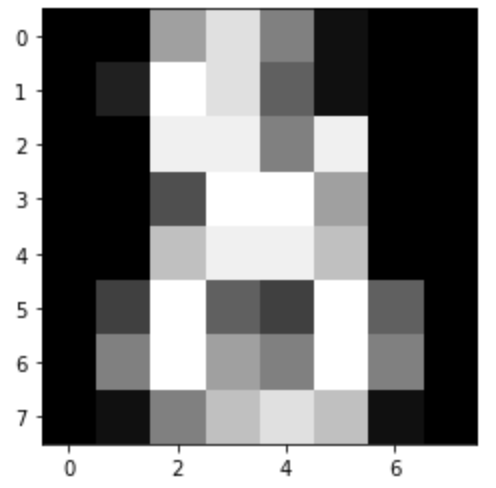
plt.imshow(digits.images[-1], cmap='gray')

from sklearn import svm
# first, we treat the estimator as a black box, and set params manually
# or we can use `grid search` and `cross validation` to determine the best params
clf = svm.SVC(gamma=0.001, C=100.)

# train(or learn) from all (except last one) digits
# validate with the last digit
clf.fit(digits.data[:-1], digits.target[:-1])
clf.predict(digits.data[-1:])
array([8])
# better practise
from sklearn.model_selection import train_test_split

# flatten the images
n_samples = len(digits.images)
data = digits.images.reshape((n_samples, -1))

# Create a classifier: a support vector classifier
clf = svm.SVC(gamma=0.001)

# Split data into 50% train and 50% test subsets
X_train, X_test, y_train, y_test = train_test_split(
    data, digits.target, test_size=0.5, shuffle=False)

# Learn the digits on the train subset
clf.fit(X_train, y_train)

# Predict the value of the digit on the test subset
predicted = clf.predict(X_test)

classification_report

classification_report builds a text report showing the main classification metrics.

confusion matrix

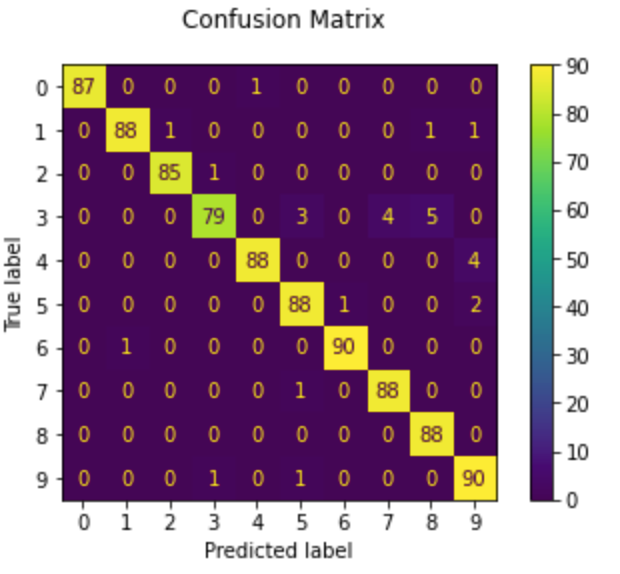
plot_confusion_matrix can e used to visually represent a confusion matrix:

$ \begin{array}{c|c} & Positive & Negative \ \hline True & TP & TN \ \hline False & FP & FN \end{array} $

混淆矩阵还有另一种写法,即横纵轴都以positive,和negative表示,而不是如上的一个是指标,一个是判断(正确,错误)。这些都不重要,自己看清楚不要臆测就好了。 如果: $ \begin{array}{c|c} & Positive & Negative \ \hline True &3 & 4 \ \hline Fa lse &1 & 2 \end{array} $

解读:

  • 预测Positive共4例,成功3,失败1
  • 预测Negative共6例,成功4,失败2

所以反推正样本3+2=5,负样1+4=5,共10例

大原则,我们看到的时候已经是结果,所以只能从结果反推真实情况,比如正确的和错误的,加起来就是样本的,等等

  • 准确率:7/10 (TP+TN/total) 根据上文的文字描述,其实就是判断成功的次数
  • 精确率:3/4 (TP/TP+FP) 即只关注一个指标(等于是竖向统计),比如正例,或负例,然后观察它错了多少。
    • 本例中,只预测了4个正,就错了一个
  • 召回率:3/5 (TP/TP+FN) 仍然只关注一个指标,比如正例,但是召回率关心你把所有的“正例“找出来多少
    • 也就是说,如果你把所有的样本判断为正例,召回率可达100%
from sklearn import metrics
print(f"Classification report for classifier {clf}:\n"
      f"{metrics.classification_report(y_test, predicted)}\n")
Classification report for classifier SVC(gamma=0.001):
              precision    recall  f1-score   support

           0       1.00      0.99      0.99        88
           1       0.99      0.97      0.98        91
           2       0.99      0.99      0.99        86
           3       0.98      0.87      0.92        91
           4       0.99      0.96      0.97        92
           5       0.95      0.97      0.96        91
           6       0.99      0.99      0.99        91
           7       0.96      0.99      0.97        89
           8       0.94      1.00      0.97        88
           9       0.93      0.98      0.95        92

    accuracy                           0.97       899
   macro avg       0.97      0.97      0.97       899
weighted avg       0.97      0.97      0.97       899
disp = metrics.plot_confusion_matrix(clf, X_test, y_test)
disp.figure_.suptitle("Confusion Matrix")
print(f"Confusion matrix:\n{disp.confusion_matrix}")

plt.show()

Conventions

Type Casting

Unless otherwise specified, input will be cast to float64:

>>> import numpy as np
>>> from sklearn import random_projection

>>> rng = np.random.RandomState(0)
>>> X = rng.rand(10, 2000)
>>> X = np.array(X, dtype='float32')
>>> X.dtype
dtype('float32')

>>> transformer = random_projection.GaussianRandomProjection()
>>> X_new = transformer.fit_transform(X)
>>> X_new.dtype
dtype('float64')

the example above, the float32 X is casst to float64 by fit_transform(X)

from sklearn import datasets
from sklearn.svm import SVC
iris = datasets.load_iris()
clf = SVC()
clf.fit(iris.data, iris.target)

print(list(clf.predict(iris.data[:3])))

# fit string
clf.fit(iris.data, iris.target_names[iris.target])

print(list(clf.predict(iris.data[:3])))
# ['setosa', 'setosa', 'setosa']
[0, 0, 0]
['setosa', 'setosa', 'setosa']

Refitting and updating parameters

Hyper-parameters of an estimator can be updated after it has been constructed via the set_params(). then you call fit(), the learned will be overwrite.

import numpy as np
from sklearn.datasets import load_iris
from sklearn.svm import SVC
X, y = load_iris(return_X_y=True)    # 注意换了种load方式

clf = SVC()
clf.set_params(kernel='linear').fit(X, y)
print('linear', clf.predict(X[:5]))

clf.set_params(kernel='rbf').fit(X, y)
print('rbf', clf.predict(X[:5]))
linear [0 0 0 0 0]
rbf [0 0 0 0 0]

Multiclass vs. multilabel fitting

When using multiclass classifiers, the learning and prediction task that is performed is dependent on the format of the target data fit upon:

from sklearn.svm import SVC
from sklearn.multiclass import OneVsRestClassifier
from sklearn.preprocessing import LabelBinarizer

X = [[1, 2], [2, 4], [4, 5], [3, 2], [3, 1]]
y = [0, 0, 1, 1, 2]

# 注意一行的写法
classif = OneVsRestClassifier(estimator=SVC(random_state=0)) 
print('1d:', classif.fit(X, y).predict(X))

# one-hot
y = LabelBinarizer().fit_transform(y)
print('y:', y)
print('one-hot:', classif.fit(X, y).predict(X))  # 可以看到,已经开始不准确了b
1d: [0 0 1 1 2]
y: [[1 0 0]
 [1 0 0]
 [0 1 0]
 [0 1 0]
 [0 0 1]]
one-hot: [[1 0 0]
 [1 0 0]
 [0 1 0]
 [0 0 0]
 [0 0 0]]

multiple label

from sklearn.preprocessing import MultiLabelBinarizer
y = [[0, 1], [0, 2], [1, 3], [0, 2, 3], [2, 4]]  # 一个instance被赋予多个label,(甚至第4个有3个label)
y = MultiLabelBinarizer().fit_transform(y)
classif.fit(X, y).predict(X)
array([[1, 1, 0, 0, 0],
       [1, 0, 1, 0, 0],
       [0, 1, 0, 1, 0],
       [1, 0, 1, 0, 0],
       [1, 0, 1, 0, 0]])

KNN (k nearest neighbors classification)

KNN是一种用身边最近的n个数据点哪个类别最多来推断自己类别的的方法,所以本质上还是有标签的(周边数据点都是打标的)

我还写过一种无监督的聚类方法,叫k-means,就因为都有个k,一度都让我混淆了起来。其实没有关系,k-means是随机选k个点当作中心点,找出与它们最近的点来聚类,然后再每个点取中心,这么迭代N次之后,聚类好的数据也会越来越远。这里只是作个旁记。

import numpy as np
from sklearn import datasets
iris_X, iris_y = datasets.load_iris(return_X_y=True)
# Split iris data in train and test data
# A random permutation, to split the data randomly
np.random.seed(0)
indices = np.random.permutation(len(iris_X))
iris_X_train = iris_X[indices[:-10]]
iris_y_train = iris_y[indices[:-10]]
iris_X_test = iris_X[indices[-10:]]
iris_y_test = iris_y[indices[-10:]]
# Create and fit a nearest-neighbor classifier
from sklearn.neighbors import KNeighborsClassifier
knn = KNeighborsClassifier()
knn.fit(iris_X_train, iris_y_train)
print(knn.predict(iris_X_test))
print(iris_y_test)
[1 2 1 0 0 0 2 1 2 0]
[1 1 1 0 0 0 2 1 2 0]

The curse of dimensionality

nearest neighbor算法,维数越高,需要的数据越多,才能保证在一点的附近有足够多的neighbor。所以一般来说当特征很多时KNN的效果会下降。当然也有例外,某次做一个20个特征的KNN时候,结果居然比随机森林还要好_(:з」∠)_场面一度十分尴尬… 参考

Shrinkage

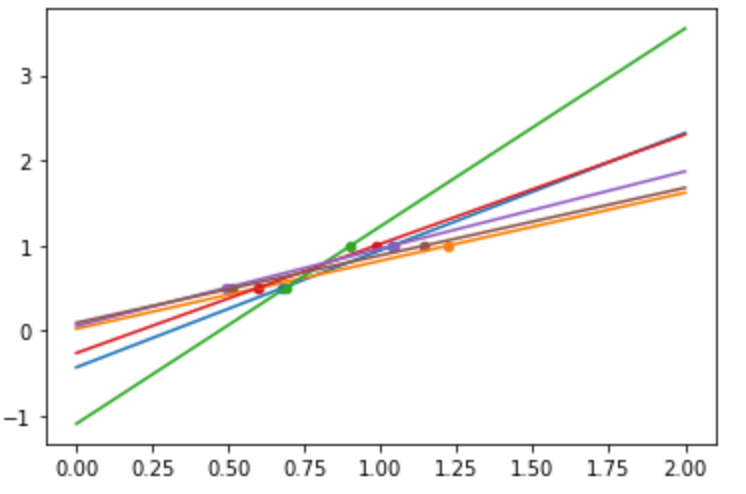
If there are few data points per dimension, noise in the observations induces high variance:

train with very few data

from sklearn import linear_model

X = np.c_[ .5, 1].T
y = [.5, 1]
test = np.c_[ 0, 2].T
regr = linear_model.LinearRegression()

import matplotlib.pyplot as plt 

np.random.seed(0)
for _ in range(6): 
    this_X = .1 * np.random.normal(size=(2, 1)) + X
    regr.fit(this_X, y)
    plt.plot(test, regr.predict(test)) 
    plt.scatter(this_X, y, s=20)

Ridge regression:

A solution in high-dimensional statistical learning is to shrink the regression coefficients to zero: any two randomly chosen set of observations are likely to be uncorrelated. This is called Ridge regression.

This is an example of bias/variance tradeoff:

the larger the ridge alpha parameter,

  • the higher the bias
  • the lower the variance.

lasso 回归和岭回归(ridge regression)其实就是在标准线性回归的基础上分别加入 L1 和 L2 正则化(regularization)。相比直接把一些特征的系数置零,只是把它们的“贡献”变小,即乘一下较低的权重(惩罚,imposing a penalty on the size of the coefficients)。

Lasso 更多用于估计稀疏样本的系数。

以下关于几个加了正则的demo和调优是整理笔记整理岔了,不是官方教程里的,但是也是我的学习笔记,正好演示一些demo和cross validation的用法就不删了。

  • L1-norm (Lasso)
  • L2-norm (Ridge)
  • (Elastic Net) (l1+l2)

Lasso:
$$J(\theta) = \frac{1}{2}\sum_{i}^{m}(y^{(i)} - \theta^Tx^{(i)})^2 + \color{red} {\lambda \sum_{j}^{n}|\theta_j|}$$

Ridge:
$$J(\theta) = \frac{1}{2}\sum_{i}^{m}(y^{(i)} - \theta^Tx^{(i)})^2 + \color{blue} {\lambda \sum_{j}^{n}\theta_j^2}$$

ElasticNet:
$$J(\theta) = \frac{1}{2}\sum_{i}^{m}(y^{(i)} - \theta^Tx^{(i)})^2 + \lambda(\rho \color{red}{\sum_{j}^{n}|\theta_j|} + (1-\rho)\color{blue}{ \sum_{j}^{n}\theta_j^2})$$

岭回归demo

from sklearn.linear_model import Ridge
from sklearn.datasets import load_boston
from sklearn.model_selection import train_test_split

boston = load_boston()   # 还记得上一节课 load_iris() 吗?
X = boston.data
y = boston.target

X_train, X_test, y_train, y_test = train_test_split(X, y, test_size=0.2, random_state=3)

model = Ridge(alpha=0.01, normalize=True)   # 用岭回归构建模型
model.fit(X_train, y_train)                 # 拟合
train_score = model.score(X_train, y_train) # 模型对训练样本得准确性
test_score = model.score(X_test, y_test)    # 模型对测试集的准确性

print(boston.data[:5], boston.target[:5])
print()
print(f"train_score: {train_score}, test_score: {test_score}")
[[6.3200e-03 1.8000e+01 2.3100e+00 0.0000e+00 5.3800e-01 6.5750e+00
  6.5200e+01 4.0900e+00 1.0000e+00 2.9600e+02 1.5300e+01 3.9690e+02
  4.9800e+00]
 [2.7310e-02 0.0000e+00 7.0700e+00 0.0000e+00 4.6900e-01 6.4210e+00
  7.8900e+01 4.9671e+00 2.0000e+00 2.4200e+02 1.7800e+01 3.9690e+02
  9.1400e+00]
 [2.7290e-02 0.0000e+00 7.0700e+00 0.0000e+00 4.6900e-01 7.1850e+00
  6.1100e+01 4.9671e+00 2.0000e+00 2.4200e+02 1.7800e+01 3.9283e+02
  4.0300e+00]
 [3.2370e-02 0.0000e+00 2.1800e+00 0.0000e+00 4.5800e-01 6.9980e+00
  4.5800e+01 6.0622e+00 3.0000e+00 2.2200e+02 1.8700e+01 3.9463e+02
  2.9400e+00]
 [6.9050e-02 0.0000e+00 2.1800e+00 0.0000e+00 4.5800e-01 7.1470e+00
  5.4200e+01 6.0622e+00 3.0000e+00 2.2200e+02 1.8700e+01 3.9690e+02
  5.3300e+00]] [24.  21.6 34.7 33.4 36.2]

train_score: 0.723706995939315, test_score: 0.7926416423787221

岭回归调优

  • Ridge regression is a penalized linear regression model for predicting a numerical value
  • and it can be very effective when applied to classification
  • the important parameter to tune is the regularization strength (alpha) in (0.1, 1.0) step = 0.1
from sklearn.linear_model import RidgeCV
from sklearn.datasets import load_boston
from sklearn.model_selection import train_test_split

boston = load_boston()
X = boston.data
y = boston.target
X_train, X_test, y_train, y_test = train_test_split(X, y, test_size=0.2, random_state=3)

# 用redge cross validation建模而不是Ridge
model = RidgeCV(alphas=[1.0, 0.5, 0.1, 0.05, 0.01, 0.005, 0.001, 0.0005, 0.0001], normalize=True)
model.fit(X_train, y_train)
print(model.alpha_)
0.01

lass demo和调优

from sklearn.linear_model import Lasso

lasso_reg = Lasso(alpha=0.1)
lasso_reg.fit(X, y)
print("lasso score", lasso_reg.score(X_test, y_test))

# 调优
lscv = LassoCV(alphas=(1.0, 0.1, 0.01, 0.001, 0.005, 0.0025, 0.001, 0.00025), normalize=True)
lscv.fit(X, y)
print('Lasso optimal alpha: %.3f' % lscv.alpha_)
lasso score 0.7956864030940746
Lasso optimal alpha: 0.010

弹性网络

大多情况下应该避免使用纯线性回归,如果特征数比较少,更倾向于Lasso回归或者弹性网络,因为它们会将无用的特征权重降为0,一般来说弹性网络优于Lasso回归

from sklearn.linear_model import ElasticNet

e_net = ElasticNet(alpha=0.1, l1_ratio=0.5)
e_net.fit(X, y)
print("e_net score:", e_net.score(X_test, y_test))

# 调优
encv = ElasticNetCV(alphas=(0.1, 0.01, 0.005, 0.0025, 0.001), 
                    l1_ratio=(0.1, 0.25, 0.5, 0.75, 0.8), 
                    normalize=True)
encv.fit(X, y)
print('ElasticNet optimal alpha: %.3f and L1 ratio: %.4f' % (encv.alpha_, encv.l1_ratio_))
e_net score: 0.7926169728251697
ElasticNet optimal alpha: 0.001 and L1 ratio: 0.5000

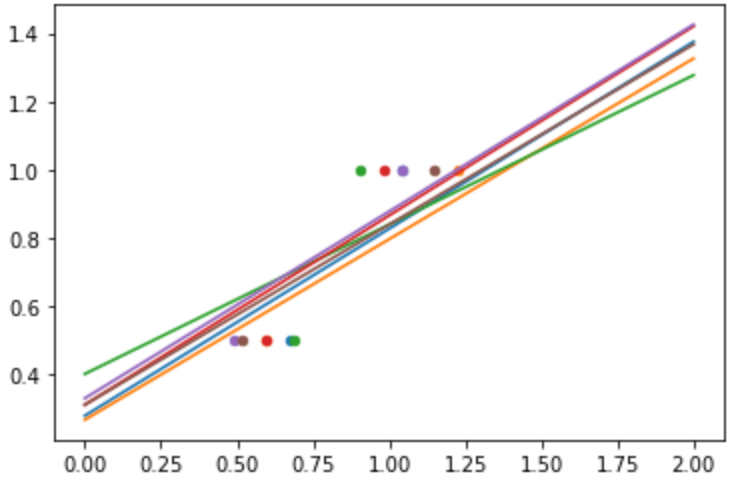
回到教程,对前例(数据过少引起的过拟合),加入了惩罚项后:

regr = linear_model.Ridge(alpha=.1)
np.random.seed(0)
for _ in range(6): 
    this_X = .1 * np.random.normal(size=(2, 1)) + X
    regr.fit(this_X, y)
    plt.plot(test, regr.predict(test)) 
    plt.scatter(this_X, y, s=20) 

# 观察图像的不同,其实可以理解为样本过少时的”过拟合“,引入忽略的指标后虽然对训练集的准确率大打折扣,但确实降低了方差

Diabetes dataset

换个数据源,estimator并不需要更换,如果需要换超参,前文也已经讲过了:

diabetes_X, diabetes_y = datasets.load_diabetes(return_X_y=True)
diabetes_X_train = diabetes_X[:-20]
diabetes_X_test  = diabetes_X[-20:]
diabetes_y_train = diabetes_y[:-20]
diabetes_y_test  = diabetes_y[-20:]

# observe the alpha and the score:

alphas = np.logspace(-4, -1, 6)  # log10(-4)到log10(-1)共6个数做alpha
print(alphas)
print([f'{regr.set_params(alpha=alpha).fit(diabetes_X_train, diabetes_y_train).score(diabetes_X_test, diabetes_y_test) * 100:.2f}%'
       for alpha in alphas])
[0.0001     0.00039811 0.00158489 0.00630957 0.02511886 0.1       ]
['58.51%', '58.52%', '58.55%', '58.56%', '58.31%', '57.06%']

Lasso regression

Lasso = least absolute shrinkage and selection operator

相比Ridge, Lasso会真的把一些feature系数置0 (sparse method),适用奥卡姆剃刀原理(Occam’s razor: prefer simpler models)

regr = linear_model.Lasso()
scores = [regr.set_params(alpha=alpha)
              .fit(diabetes_X_train, diabetes_y_train)
              .score(diabetes_X_test, diabetes_y_test)
          for alpha in alphas]
best_alpha = alphas[scores.index(max(scores))]
regr.alpha = best_alpha   # 不链式调用的话不需要用set_params
regr.fit(diabetes_X_train, diabetes_y_train)
print(regr.coef_)
[   0.         -212.43764548  517.19478111  313.77959962 -160.8303982
   -0.         -187.19554705   69.38229038  508.66011217   71.84239008]

Different algorithms for the same problem

Different algorithms can be used to solve the same mathematical problem. For instance the Lasso object in scikit-learn solves the lasso regression problem using a coordinate descent method, that is efficient on large datasets. However, scikit-learn also provides the LassoLars object using the LARS algorithm, which is very efficient for problems in which the weight vector estimated is very sparse (i.e. problems with very few observations).

Classification

Logistic Regerssion

log = linear_model.LogisticRegression(C=1e5)
log.fit(iris_X_train, iris_y_train)
LogisticRegression(C=100000.0)
  • The C parameter controls the amount of regularization in the LogisticRegression object:
    • a large value for C results in less regularization.
  • penalty="l2" gives Shrinkage (i.e. non-sparse coefficients),
  • penalty="l1" gives Sparsity.

DEMO: 比较KNNLogisticRegression

from sklearn import datasets, neighbors, linear_model

X_digits, y_digits = datasets.load_digits(return_X_y=True)
X_digits = X_digits / X_digits.max()

n_samples = len(X_digits)

X_train = X_digits[:int(.9 * n_samples)]
y_train = y_digits[:int(.9 * n_samples)]
X_test = X_digits[int(.9 * n_samples):]
y_test = y_digits[int(.9 * n_samples):]

knn = neighbors.KNeighborsClassifier()
logistic = linear_model.LogisticRegression(max_iter=300)

print('KNN score: %f' % knn.fit(X_train, y_train).score(X_test, y_test))
print('LogisticRegression score: %f'
      % logistic.fit(X_train, y_train).score(X_test, y_test))
KNN score: 0.961111
LogisticRegression score: 0.933333

Support vector machines (SVMs)

支持向量机(support vector machines,SVM)是一种二分类模型,它的基本模型是定义在特征空间上的间隔最大的线性分类器。除此之外,SVM算法还包括核函数,核函数可以使它成为非线性分类器。

Support Vector Machines belong to the discriminant model family:

they try to find a combination of samples to build a plane maximizing the margin between the two classes. Regularization is set by the C parameter:

  • a small value for C means the margin is calculated using many or all of the observations around the separating line (more regularization);
  • a large value for C means the margin is calculated on observations close to the separating line (less regularization).

SVMs can be used:

  • in regression –SVR (Support Vector Regression)–,
  • or in classification –SVC (Support Vector Classification).

SVM模型有两个非常重要的参数C与gamma。其中:

  • C是惩罚系数,即对误差的宽容度。c越高,说明越不能容忍出现误差,容易过拟合。C越小,容易欠拟合。C过大或过小,泛化能力变差
  • gamma是选择RBF函数作为kernel后,该函数自带的一个参数。隐含地决定了数据映射到新的特征空间后的分布,gamma越大,支持向量越少,gamma值越小,支持向量越多。支持向量的个数影响训练与预测的速度。

Using kernels

Classes are not always linearly separable in feature space. The solution is to build a decision function that is not linear but may be polynomial instead.

This is done using the kernel trick that can be seen as creating a decision energy by positioning kernels on observations:

Linear kernal

svc = svm.SVC(kernel='linear')

Polynomial kernel

svc = svm.SVC(kernel='poly', degree=3)

RBF kernel (Radial Basis Function)

svc = svm.SVC(kernel='rfb')

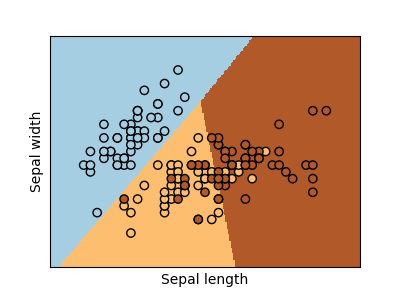
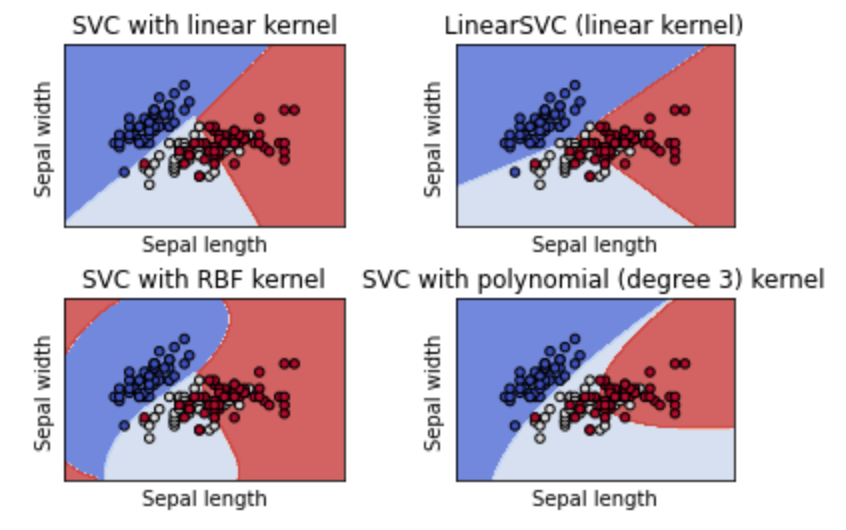
DEMO: Plot different SVM classifiers in the iris dataset

  • LinearSVC minimizes the squared hinge loss while SVC minimizes the regular hinge loss.
  • LinearSVC uses the One-vs-All (also known as One-vs-Rest) multiclass reduction while SVC uses the One-vs-One multiclass reduction.
# 代码片段,定义4个estimator
C = 1.0  # SVM regularization parameter
models = (svm.SVC(kernel='linear', C=C),
          svm.LinearSVC(C=C, max_iter=10000),
          svm.SVC(kernel='rbf', gamma=0.7, C=C),
          svm.SVC(kernel='poly', degree=3, gamma='auto', C=C))
models = (clf.fit(X, y) for clf in models)

cross validation

https://scikit-learn.org/stable/modules/cross_validation.html#cross-validation

RAW DEMO: KFold cross-validation:

import numpy as np
from sklearn import datasets, svm

X_digits, y_digits = datasets.load_digits(return_X_y=True)
svc = svm.SVC(C=1, kernel='linear')

score = svc.fit(X_digits[:-100], y_digits[:-100]).score(X_digits[-100:], y_digits[-100:])
print(score)

X_folds = np.array_split(X_digits, 3)  # 分成了3个fold
y_folds = np.array_split(y_digits, 3)
scores = list()
for k in range(3):
    # We use 'list' to copy, in order to 'pop' later on
    X_train = list(X_folds)
    X_test = X_train.pop(k) # 取出最后一个fold # 不对,python居然可以Pop任意一个索引
    X_train = np.concatenate(X_train) # 把剩下的fold拼回去
    y_train = list(y_folds)
    y_test = y_train.pop(k)
    y_train = np.concatenate(y_train)
    scores.append(svc.fit(X_train, y_train).score(X_test, y_test))
scores
0.98
[0.9348914858096828, 0.9565943238731218, 0.9398998330550918]

Scikit-learn肯定是提供了官方支持的:

from sklearn.model_selection import KFold, cross_val_score

# step 1: 用KFold和fold数做一个KFold对象,然后用这个KFold对象去循环(其实就是一个generator)
# step 2: 每次循环自己手动计算score
k_fold = KFold(n_splits=3)
scores = [svc.fit(X_digits[train], y_digits[train]).score(X_digits[test], y_digits[test]) \
         for train, test in k_fold.split(X_digits)]
scores

[0.9348914858096828, 0.9565943238731218, 0.9398998330550918]

可见官方api分折和我们手动split,每次从后向前取一折做测试集结果是一致的
当然,打印cross_validation的结果也是有封装的:
```python
# 把KFolder对象传入即可
scores = cross_val_score(svc, X_digits, y_digits, cv=k_fold)
print(scores)

# 定制scoring method:
scores = cross_val_score(svc, X_digits, y_digits, cv=k_fold, scoring='precision_macro')
print(scores)
[0.93489149 0.95659432 0.93989983]
[0.93969761 0.95911415 0.94041254]
Cross-validation generators:

see more cross-validation generators:

$ \begin{array}{l|l|l} KFold & StratifiedKFold & GroupKFold \ \hline ShuffleSplit & StratifiedShuffleSplit & GroupShuffleSplit \ \hline LeaveOneGroupOut & LeavePGroupOut & LeaveOneOut \ \hline LeavePOut & PredefinedSplit \end{array} $

Datatransformation with held out data

>>> from sklearn import preprocessing
>>> X_train, X_test, y_train, y_test = train_test_split(
...     X, y, test_size=0.4, random_state=0)
>>> scaler = preprocessing.StandardScaler().fit(X_train)
>>> X_train_transformed = scaler.transform(X_train)
>>> clf = svm.SVC(C=1).fit(X_train_transformed, y_train)
>>> X_test_transformed = scaler.transform(X_test)
>>> clf.score(X_test_transformed, y_test)
0.9333...

>>> from sklearn.pipeline import make_pipeline
>>> clf = make_pipeline(preprocessing.StandardScaler(), svm.SVC(C=1))
>>> cross_val_score(clf, X, y, cv=cv)
array([0.977..., 0.933..., 0.955..., 0.933..., 0.977...])

cross_validate v.s. cross_val_score

The cross_validate function differs from cross_val_score in two ways:

  • It allows specifying multiple metrics for evaluation.
  • It returns a dict containing fit-times, score-times (and optionally training scores as well as fitted estimators) in addition to the test score.
>>> from sklearn.model_selection import cross_validate
>>> from sklearn.metrics import recall_score
>>> scoring = ['precision_macro', 'recall_macro']
>>> clf = svm.SVC(kernel='linear', C=1, random_state=0)
>>> scores = cross_validate(clf, X, y, scoring=scoring)  # 以字典返回validate几个指标
>>> sorted(scores.keys())
['fit_time', 'score_time', 'test_precision_macro', 'test_recall_macro']
>>> scores['test_recall_macro']
array([0.96..., 1.  ..., 0.96..., 0.96..., 1.        ])

grid search

https://scikit-learn.org/stable/modules/grid_search.html#grid-search

对不同参数进行组合遍历,目的是为了maximize the cross-validation score

from sklearn.model_selection import GridSearchCV, cross_val_score
Cs = np.logspace(-6, -1, 10)
clf = GridSearchCV(estimator=svc, param_grid=dict(C=Cs), n_jobs=-1)
clf.fit(X_digits[:1000], y_digits[:1000])
print('best score:', clf.best_score_)
print('best estimator.c:', clf.best_estimator_.C)
# Prediction performance on test set is not as good as on train set
score = clf.score(X_digits[1000:], y_digits[1000:])
print('score:', score)
best score: 0.95
best estimator.c: 0.0021544346900318843
score: 0.946047678795483

与此同时,每个estimator也有自己的CV版本(跟之前串课的笔记呼应上了)

from sklearn import linear_model, datasets
lasso = linear_model.LassoCV()
X_diabetes, y_diabetes = datasets.load_diabetes(return_X_y=True)
lasso.fit(X_diabetes, y_diabetes)
# The estimator chose automatically its lambda:
lasso.alpha_
0.003753767152692203

Unsupervised learning: seeking representations of the data

Clustreing: grouping observations together

K-means clustreing

随机选k个质心计算所有的点的距离,然后再取每个群里的均值做质心,如此往复。结果的随机性很强(前面剧透了,把k-means和knn搞混过)

from sklearn import cluster, datasets
X_iris, y_iris = datasets.load_iris(return_X_y=True)
k_means = cluster.KMeans(n_clusters=3)
k_means.fit(X_iris)
print(k_means.labels_[::10])
print(y_iris[::10])
[0 0 0 0 0 1 1 1 1 1 2 2 2 2 2]
[0 0 0 0 0 1 1 1 1 1 2 2 2 2 2]
k_means.cluster_centers_
array([[5.006     , 3.428     , 1.462     , 0.246     ],
       [5.9016129 , 2.7483871 , 4.39354839, 1.43387097],
       [6.85      , 3.07368421, 5.74210526, 2.07105263]])

未完结

https://scikit-learn.org/stable/tutorial/statistical_inference/unsupervised_learning.html

从投影、正交补角度证明(推导)最小二乘法公式

学习线性回归的时候,会教我们$X\theta=y$可以直接用最小二乘法直接把$\theta$求出来:

$\theta=(X^TX)^{-1}X^Ty$

并且还在我之前的博文里直接应用了一番(那是根据公式来应用,即如何构建正确的A和y,从而应用公式直接求解$\theta$),里面还引了一篇详实的证明文章。

首先,在吴恩达的教材里,这个并不叫最小二乘(least suqare),而是叫Normal Equation method,这个不重要,毕竟在可汗学院的教材里,又叫最小二乘了^^。今天补充的内容,就是在回顾之前的笔记的时候,发现了大量的证明和应用这个公式的地方,而且全是在引入了投影(Projection)概念之后。因为那个时候并没有接触机器学习,看了也就看了,现在看到了应用场景,那就闭环了,回顾一下:

首先,预备知识

子空间

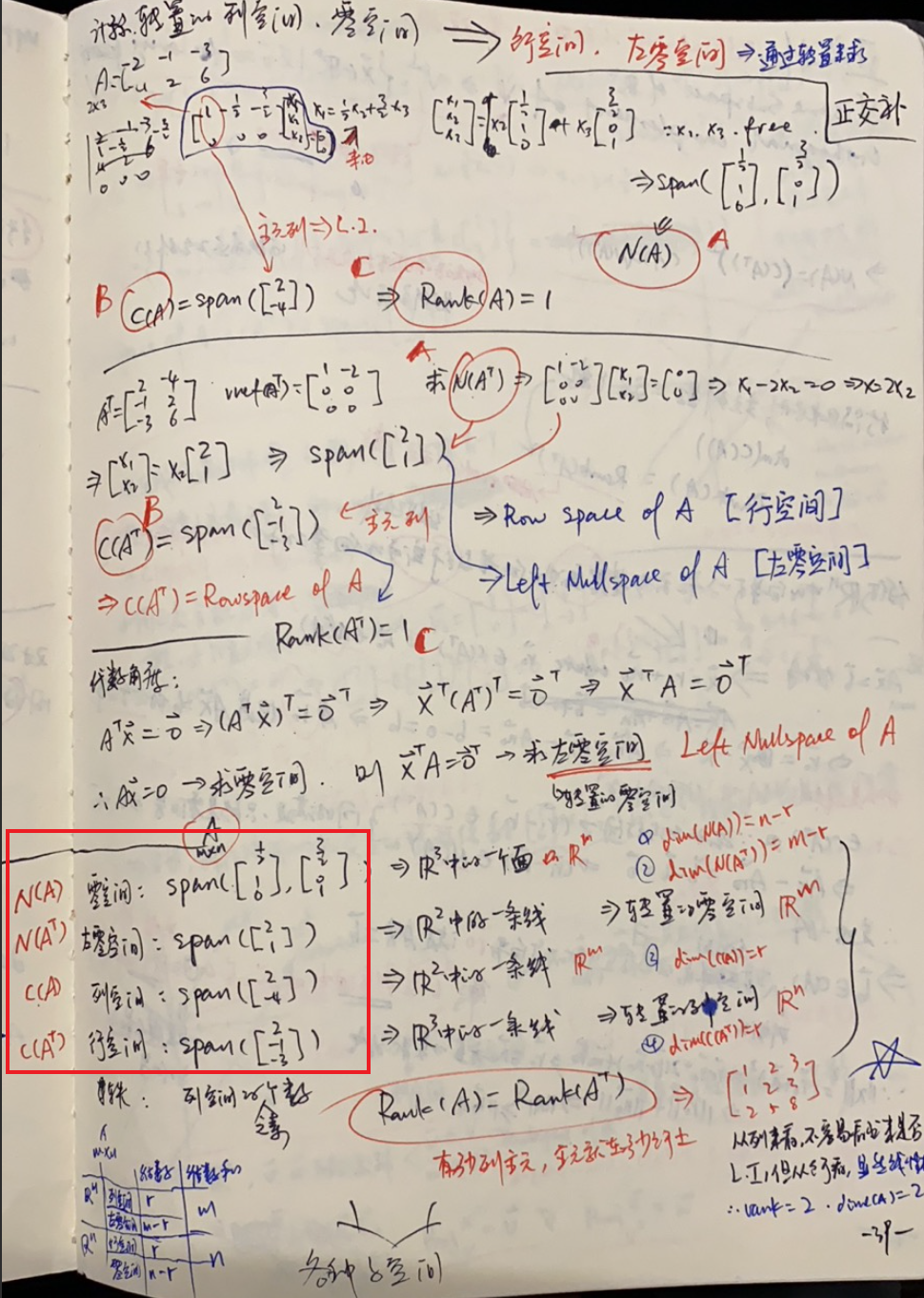
笔记很清楚了,对于一个矩阵 $A= \begin{bmatrix} -2 & -1 & -3 \ 4 & 2 & 6 \ \end{bmatrix}$ 它的列空间是自然是C(A),行空间自然是A的转置的后的列空间,然后各自拥有一个对应的零空间(即求解$Ax=0, A^Tx=0)$

上图用红框框出来的部分即是具体这个矩阵$A$的四个子空间。同时,拥有如下性质:

  1. $C(A)$与$N(A^T)$正交(orthogonal),即列空间与左零空间正交
  2. $C(A^T)$与$N(A)$正交,即行空间与零空间正交

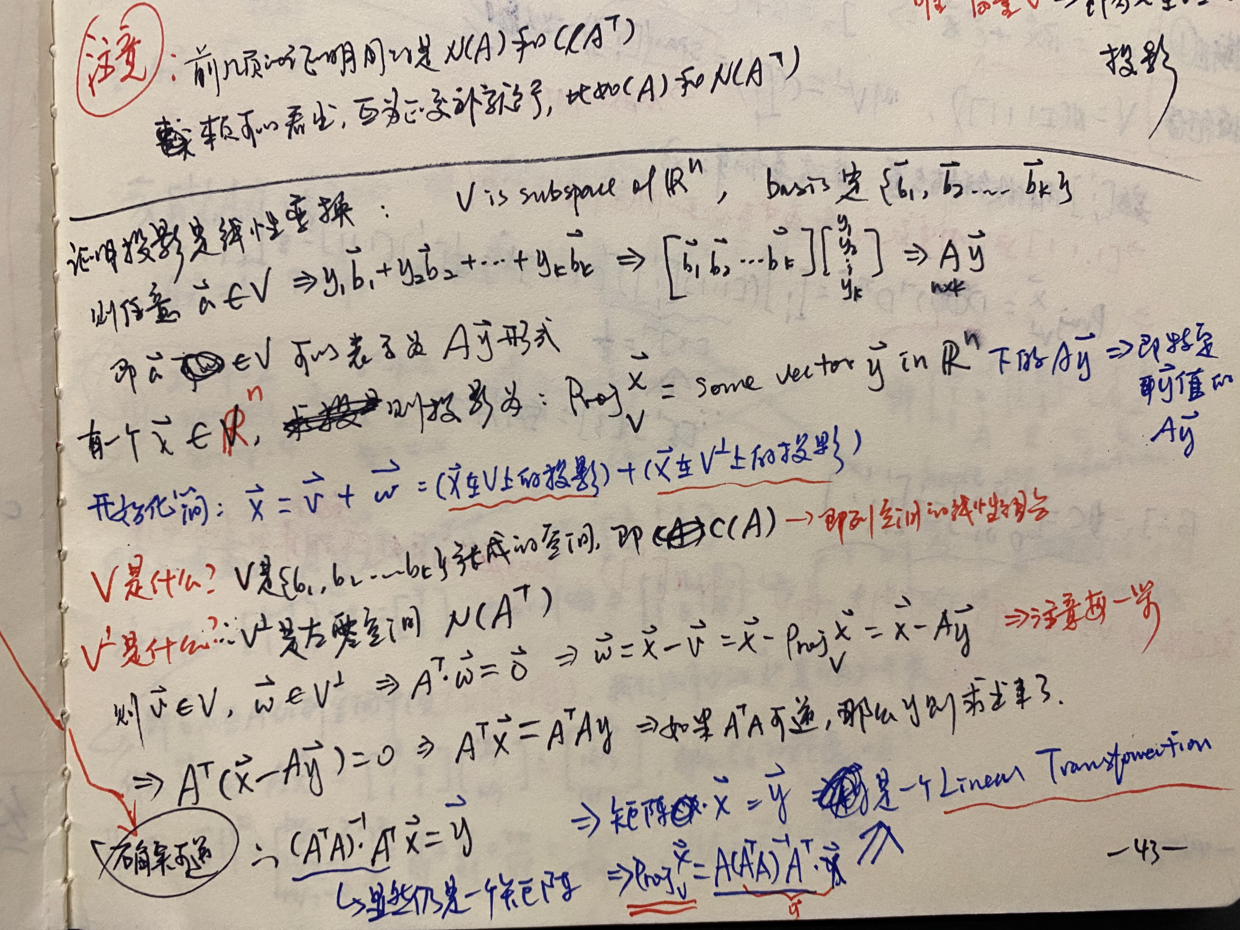
正交补

$V^\bot = {\vec x \in \R^n | \vec x \cdot \vec{v} = 0; for; every\ \vec{v} \in V \text{}}$ 即V的正交补为垂直于V内任意一个向量的所有向量。

那么:

  • $C(A) = (N(A^T))^\bot$
  • $C(A^T) = (N(A))^\bot$

投影是一个线性变换

这里已经看到我们熟悉的$(A^TA)^{-1}A^Tx$了,我们来看一下推导过程:
  1. $\vec x$在$V \in \R^n$上的投影$Proj_V^{\vec x} = \vec v$必然能表示成该空间的basis{$\vec b_1, \vec b_2, \vec b_3, \dots$}的线性变换:$\vec v \in V = y_1\vec b_1 + y_2\vec b_2 + \cdots + y_k \vec b_k = A\vec y$
  2. 求出$\vec y$则求出了这个投影在哪里
  3. $\vec x$能向$V$投影,自然也能向$V^\bot$投影($\vec w$)
  • 这里是故意这么说的,强调都是投影,其实在向$V$投影时,在$V^\bot$的投影($\vec w$)就是那条垂线
  1. $V \Rightarrow C(A),; V^\bot \Rightarrow N(A^T), \vec v \in V, \vec w \in V^\bot$
  2. 左零空间只不过是转置的零空间,那么零空间的特性是什么呢?即$A\vec x = 0$的空间,那么$\vec w$在左零空间里,意味着: $A^T\vec w = 0$
  3. $\vec w = \vec x - \vec v = \vec x - A\vec y \Rightarrow A^T(\vec x - A\vec y) = 0 \Rightarrow A^T \vec x = A^TA\vec y$
  4. 只要$A^TA$可逆的话: $\Rightarrow \vec y= (A^TA)^{-1}A^T\vec x$
  5. $\therefore Proj_V^{\vec x} = A\vec y = A(A^TA)^{-1}A^T\vec x$
  6. 得证$\vec x$在$V$上的投影就是一个线性变换
  7. $\vec y$即是机器学习中我们需要学习到的系数 = $(A^TA)^{-1}A^T$

最小二乘逼近

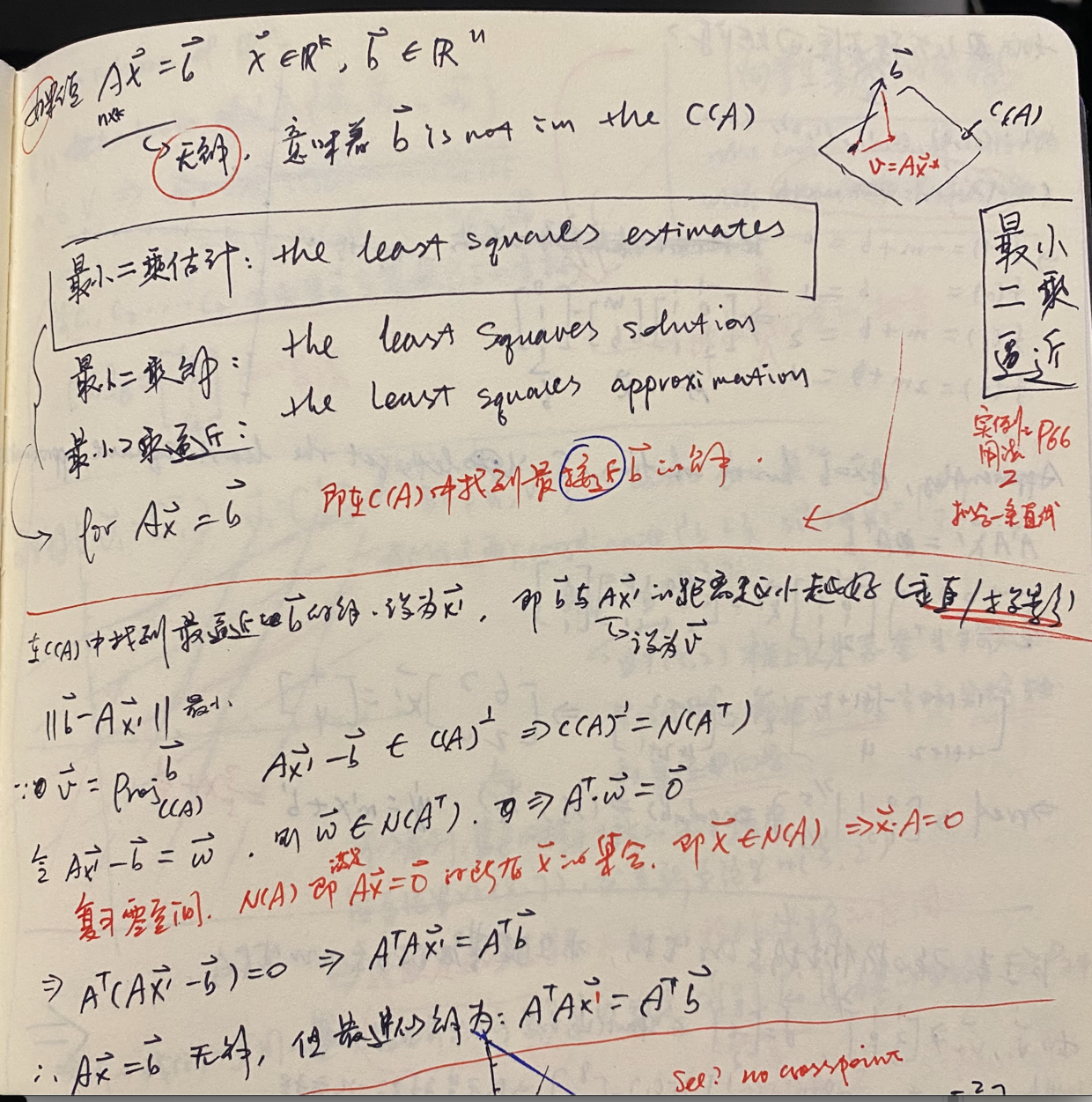
由此到了下一课,the lease squares approximation,讲的就是$A\vec x = \vec b$无解时,意思就是在$\vec b$不存在A的张成子空间中,所以无论进行怎样的线性变换,都是不可能得到$\vec b$的,则取$\vec x$在$C(A)$中的投影作为近似的解(证明就不再展开了)

仍然用的是同一个思路,即"垂线在左零空间中",来构造$A^T\cdot \vec w = \vec 0$

应用最小二乘拟合一条回归线

这里终于讲到了与机器学习最接近的内容:regression

可以看到,毫无业务思维的花花肠子,很多机器学习课程里会花大量工夫从感性到理性上给你讲这些内容,因为它的期望从0跟你讲清楚,而在循序渐进的数学理论体系里,这些根本就不需要关联感性认识的,什么每年的房价啊,数学关注的只是建模。

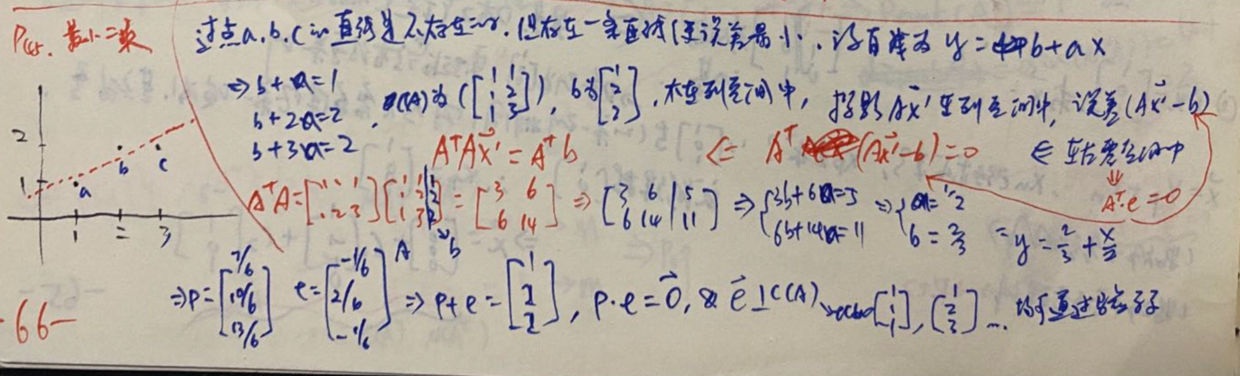
这个回归实例里,因为需要拟合的是一条直线:$y = b + ax$,那么既有的数据就成了机器学习里的“样本”,但我们这里不需要这么理解,而是直接理解为矩阵,得到 方程组:

$$\begin{cases} b + a = 1 \\ b + 2a = 2 \\ b + 3a = 2 \end{cases}$$

提取矩阵:

$$A = \begin{bmatrix}1&1\\1& 2\\ 1& 3\end{bmatrix}, \vec b = \begin{bmatrix}1\\2\\ 2\end{bmatrix} \Rightarrow A\vec x = \vec b$$

好了,在上面提到的这篇博文里,我们不明就里地直接用了公式,已知A和b求变换矩阵M(即这里的$\vec x$),还当成是机器学习的内容,而现在我们已经知道自己是在做什么,就是找b在$A$的张成子空间里的投影,就能得到最近似的解

$$\vec x \approx (A^TA)^{-1}A^T\vec b$$

矩阵最小二乘法求解仿射变换矩阵

一个矩形三个顶点(0,0), (50, 0), (50, 50), 变换后为(30, 30), (30, 130), (130, 130), 求其仿射矩阵。

我们分别设起始和结束矩阵的坐标为:$(a_x, a_y), (b_x, b_y), (c_x, c_y)$, 变换后的加一个prime($ ^\prime$)符号,以此类推。
要知道,一个3X2的矩阵是不可能右乘一个矩阵得到一个3X2的矩阵(只能左乘一个3X3的),
然后,每一个新坐标,都是由原坐标的(x, y)经过变换得到(x', y‘),即使是新坐标的X值,也是需要原坐标的(x, y)值参与过来进行变化的(乘以合适的系数),然后还要加上偏移的系数,以x'为例,应该是这样:$a^\prime_x = a_x m_{00} + a_y m_{01} + m_{02} $ 我们根据矩阵特征,补一个1,构造这个矩阵看看效果:

$$ \begin{bmatrix} \color{red}{a_x} & \color{red}{a_y} & \color{red}1 \\ b_x & b_y & 1 \\ c_x & c_y & 1 \\ \end{bmatrix} \begin{bmatrix} \color{red}{m_{00}} \\ \color{red}{m_{01}} \\ \color{red}{m_{02}} \end{bmatrix} = \begin{bmatrix} \color{red}{a^\prime_x} \\ b^\prime_x \\ c^\prime_x \end{bmatrix} \tag{红色部分即为上面的等式} $$

这只是把三个x给变换出来了,其实你也可以认为这是把y给变换出来了(因为原理一样,只是系数不同)。
做到这一步,我们已经知道要如何求y坐标了,即我们只补一列的话,只能得到一个坐标的x值(或y值),要求另一半,根据坐标相乘的原理,看来只能把前三列置零,再把后三列复制进去了(__这样仿射矩阵也就变成6X1了__),其实就是上面矩阵乘法的重复,只不过交错一下形成x,y交错的排列:

$$ \begin{bmatrix} a_x & a_y & 1 & 0 & 0 & 0 \\ 0 & 0 & 0 & a_x & a_y & 1 \\ b_x & b_y & 1 & 0 & 0 & 0 \\ 0 & 0 & 0 & b_x & b_y & 1 \\ c_x & c_y & 1 & 0 & 0 & 0 \\ 0 & 0 & 0 & c_x & c_y & 1 \end{bmatrix} \begin{bmatrix} m_{00} \\ m_{01} \\ m_{02} \\ m_{10} \\ m_{11} \\ m_{12} \end{bmatrix} = \begin{bmatrix} a^\prime_x \\ a^\prime_y \\ b^\prime_x \\ b^\prime_y \\ c^\prime_x \\ c^\prime_y \\ \end{bmatrix} $$

原理当然就是把第一个公式补全:

$$ \begin{cases} \; a^\prime_x = a_x m_{00} + a_y m{01} + m_{02} \\ \; a^\prime_y = a_x m_{10} + a_y m{11} + m_{12} \\ \\ \; b^\prime_x = b_x m_{00} + b_y m{01} + m_{02} \\ \; b^\prime_y = b_x m_{10} + b_y m{11} + m_{12} \\ \\ \; c^\prime_x = c_x m_{00} + c_y m{01} + m_{02} \\ \; c^\prime_y = c_x m_{10} + c_y m{11} + m_{12} \\ \end{cases} $$

最小二乘的公式如下:

$$ \begin{aligned} &\lVert A\beta - Y \rVert{^2_2} \quad A \in \mathbb{R}^{(m\times n+1)}, \beta \in \mathbb{R}^{(n+1)\times 1}, Y \in \mathbb{R}^{m\times 1} \\ &\hat \beta = (A^TA)^{-1}A^TY \end{aligned} $$

推导过程见此

奇异矩阵没有逆矩阵,$(A^TA)^{-1}$会出现无法求解的问题,也就是该方法对数据是有约束的,这个有解,另议。

我们把A和Y都做出来了,直接套用公式即可,为了编程方便,我们把前后矩阵设为A和B,仿射矩阵为M,就成了:

$$ M = (A^TA)^{-1}A^TB $$

import numpy as np

A = [[0,0], [50, 0], [50, 50]]
B = [[30, 30], [130, 30], [130, 130]]

# 分别整理成上面分析的6x6和6x1的矩阵
# 先定义变量保留6个坐标的值
(ax, ay), (bx, by), (cx, cy) = A
(ax1, ay1), (bx1, by1), (cx1, cy1) = B

A = np.array([
    [ax, ay, 1, 0, 0, 0],
    [0, 0, 0, ax, ay, 1],
    [bx, by, 1, 0, 0, 0],
    [0, 0, 0, bx, by, 1],
    [cx, cy, 1, 0, 0, 0],
    [0, 0, 0, cx, cy, 1]
])
B = np.array([ax1, ay1, bx1, by1, cx1, cy1]).reshape(6, 1) # 比手写6X1矩阵要省事
M = np.linalg.inv(A.T @ A) @ A.T @ B # 套公式
M.reshape(2, 3)

输出:

array([[ 2.,  0., 30.],
       [ 0.,  2., 30.]])

上就是最小二乘的一个应用,也给了一篇链接介绍推导,后来我翻阅学习线代时的笔记,其实有从投影方面给的解释,直观易懂,于是另写了篇博文来介绍这个推导。

add_subplots方法传递额外参数

用matplotlib绘制3D图,最快的用法

ax = plt.axes(projection='3d')

此后即可  `ax.plot`, `ax.scatter`具体用法请翻阅文档

其次,这样:

fig = plt.figure()
ax = fig.add_subplot(121, projection='3d')

而我喜欢要同时绘多栏图的时候喜欢用plt.subplots方法,却发现传不进projection参数,仔细看文档,是支持用subplot_kw来为它添加的subplots来进行属性设置的,这样可以保持外层api干净而不必把subplots的所有属性都复制一遍

fig, axs = plt.subplots(nrows=2, ncols=3, **{"subplot_kw": {'projection': '3d'}})
# 或
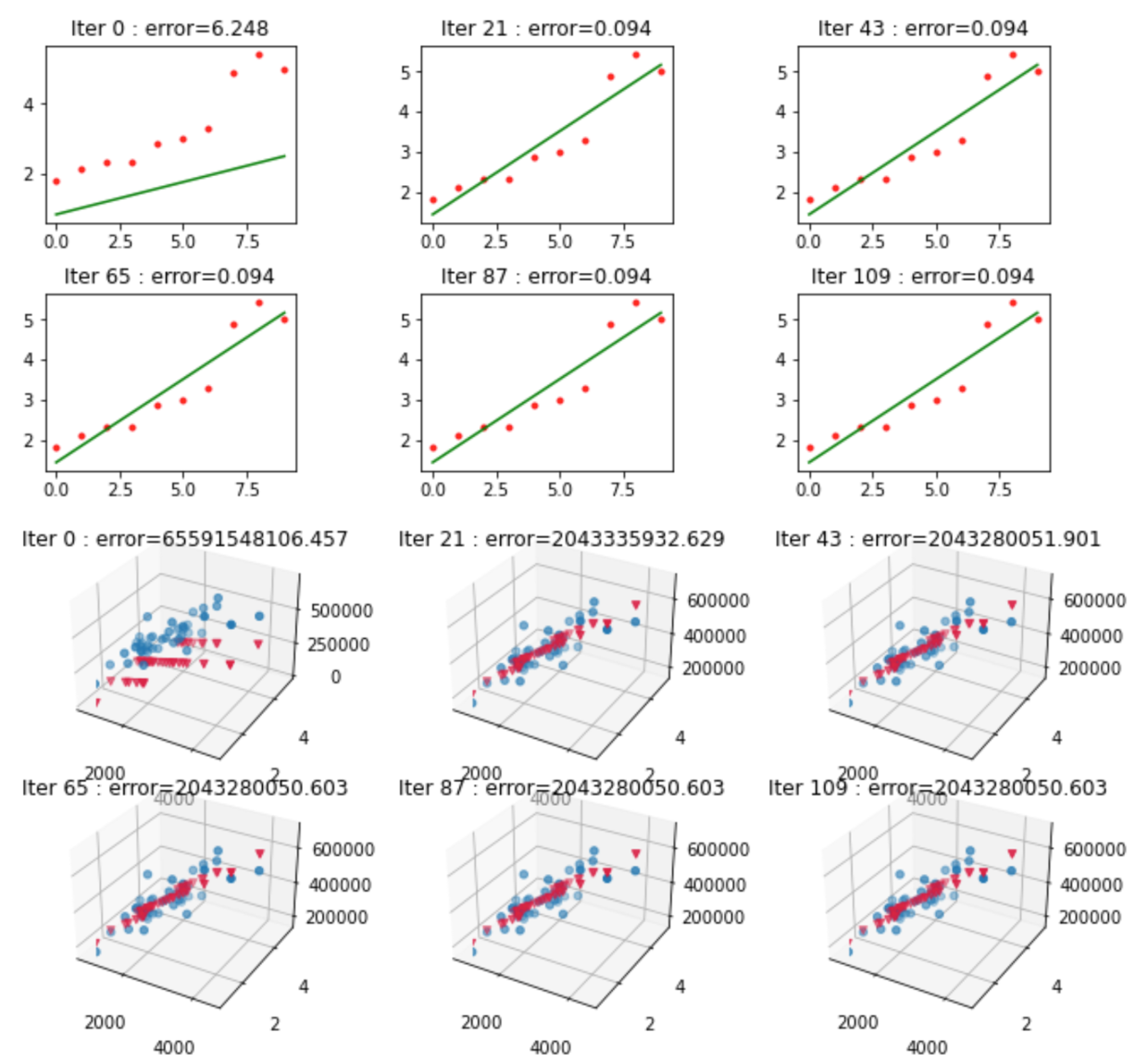
fig, axs = plt.subplots(nrows=2, ncols=3, subplot_kw=dict(projection='3d'))

看你自己习惯了。

二分法、牛顿法和梯度下降法开根号和解方程

二分法

二分法的思路是每次排除一半样本的试错方法,把样本一分为二(A和B),那么目标值不在A就在B里,不断缩小范围。

就像在玩一个猜价格的游戏,通过告诉你猜高了还是低了,你总能猜到正确价格一样,设计好一个计算差值的函数能大体上判断出你下一轮尝试的值应该在前一半还是后一半,总能迭代到足够接近的结果。

对于求平方根来说,我们没什么过多的设计,直接对中值取平方,高了就取小的一半,低了就取大的一半,实测小的数字是没问题的,这里仅仅用来演示思路。

import math

def binary_sqrt(n):
    epsilon = 1e-10         # quit flag
    start = 0
    end = n
    mid = start + (end - start) / 2
    diff = mid ** 2 - n
    while abs(diff) >= epsilon:
        # 值过大则尝试小的一半,否则就尝试大的一半,修改边界值即可
        if diff > 0:
            end = mid
        else:
            start = mid
        mid = start + (end - start) / 2
        diff = mid ** 2 - n
    return mid

for i in range(1,11):
    print(f'estimated:\t{binary_sqrt(i)}, \t sqrt({i}): \t {math.sqrt(i)}')

output:

estimated:	0.9999999999708962, 	 sqrt(1): 	 1.0
estimated:	1.4142135623842478, 	 sqrt(2): 	 1.4142135623730951
estimated:	1.7320508075645193, 	 sqrt(3): 	 1.7320508075688772
estimated:	2.0000000000000000, 	 sqrt(4): 	 2.0
estimated:	2.2360679775010794, 	 sqrt(5): 	 2.23606797749979
estimated:	2.4494897427794060, 	 sqrt(6): 	 2.449489742783178
estimated:	2.6457513110653963, 	 sqrt(7): 	 2.6457513110645907
estimated:	2.8284271247393917, 	 sqrt(8): 	 2.8284271247461903
estimated:	2.9999999999890860, 	 sqrt(9): 	 3.0
estimated:	3.1622776601579970, 	 sqrt(10): 	 3.1622776601683795

牛顿法

我就算不画图也能把这事说清楚。

牛顿法用的是斜率的思想,对$f(x)=0$,选一个足够接近目标值($x$)的点($x_0$),计算其切线与X轴的交点($x_1$),这个交点$x_1$往往比$x_0$更接近$x$,数次迭代后肯定越来越接近目标值$x$。

  1. 问题转化成一个求函数上任一点($x_n$)的切线与X轴的交点($x_{n+1}$)的问题(我们假设n+1n的左边,即向左来逼近$x_0$)
  2. 令$\Delta x = x_n - x_{n+1}, \Delta y = f(x_n) - f(x_{n+1})$,则$f'(x_n) = 该点斜率 = \frac{\Delta y}{\Delta x}$
  3. 展开:$f'(x_n) = \frac{f(x_n) - f(x_{n +1})}{x_n - x_{n+1}}$
  4. $\because f(x_{n+1})=0\ \Rightarrow x_{n +1} = x_n - \frac{f(x_n)}{f'(x_n)}$
  5. 至此,我们用$x_n$推出了一个离$x_0$更近的点:$x_{n+1}$
  6. 如此往复则可以推出足够精度的解。

而求任意正整数$a$的平方根,

  1. 函数就变成了 $g(x) = a, \Rightarrow g(x) = x^2$,
  2. 那么我们有: $f(x) = g(x) - a = 0 = x^2 - a = 0$
  3. $f'(x) = 2x$
  4. $f(x),f'(x)$都有了,就能代入上面得到的公式:$x_{n+1} = x_n - \frac{f(x_n)}{f'(x_n)}$了
  5. 得到$x_{n+1} = x_n - \frac{x_n^2-a}{2x_n}$

现在可以写代码了,不断去迭代,求下一个$x_{n+1}$:

def newton_sqrt(n):
    x_n = n / 2
    epsilon = 1e-10             # quit flag

    f_x = lambda a : a**2 - n   # f(x)=x^2 - a
    df_x = lambda a : 2*a       # derivative of f(x)
    x_next = lambda a : a - f_x(a) / df_x(a)

    while abs(x_n ** 2 - n) > epsilon:
        x_n = x_next(x_n)
    return x_n

for i in range(1, 10):
    print(f'sqrt({i})\t{newton_sqrt(i)}')

output

sqrt(1)	1.000000000000001
sqrt(2)	1.4142135623746899
sqrt(3)	1.7320508075688772
sqrt(4)	2.0
sqrt(5)	2.23606797749979
sqrt(6)	2.4494897427831788
sqrt(7)	2.6457513110646933
sqrt(8)	2.8284271247493797
sqrt(9)	3.0

梯度下降法

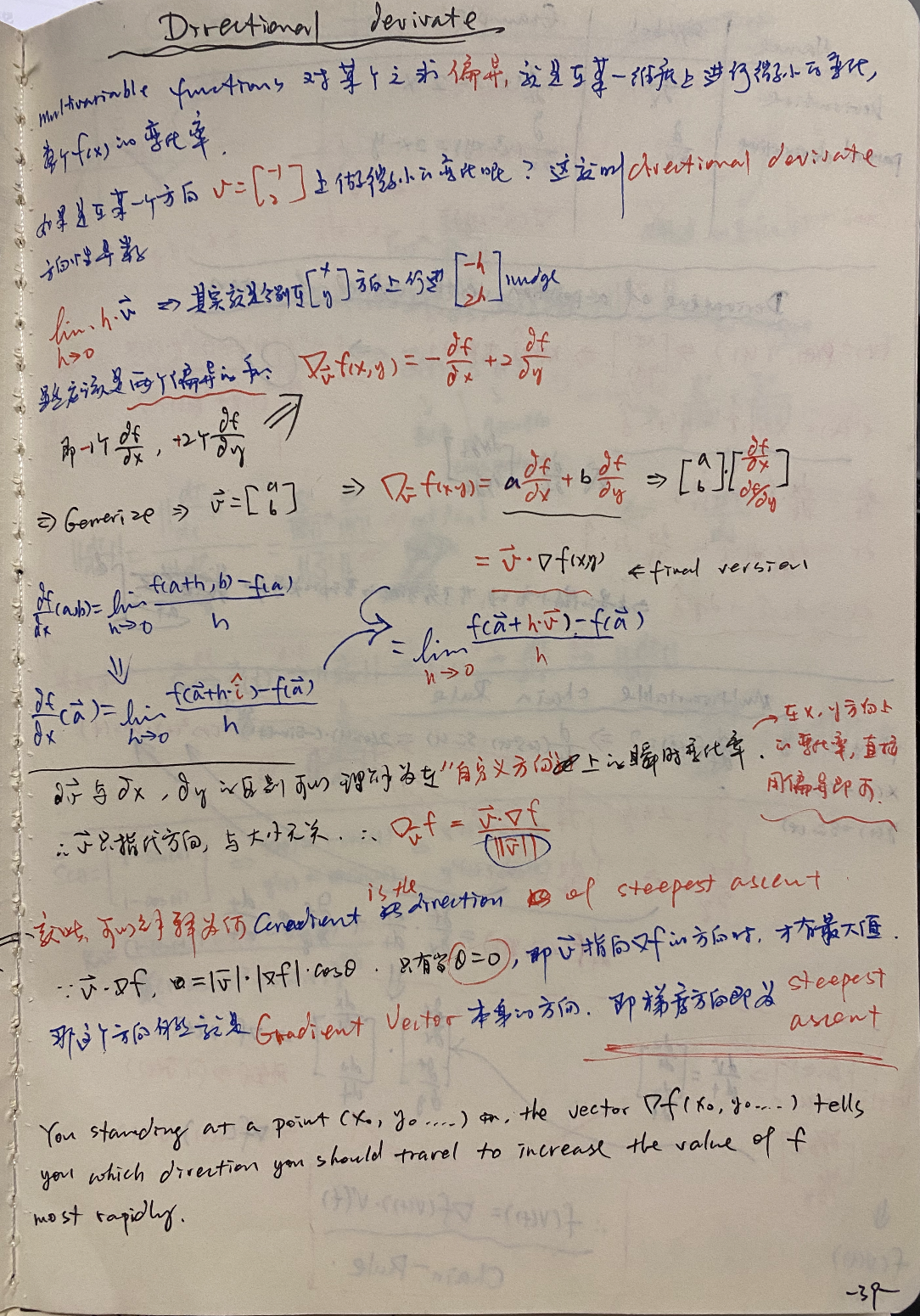
梯度下降法的数学原理是$f(x_1,x_2,\dots$)的gradient($\nabla f$)就是其最陡爬升方向(steepest ascent)。

可以拿这个当成结论,也可以去感性认识,而要去证明的话,网上有数不清的教程,在花书(《Deep Learning深度学习》)和可汗学院里,都是用的directional derivate来解释(证明)的,即”自定义方向上的瞬时变化率“,也是我认为在如果有多变量微积分的基础下,比较容易让人接受且简单直白的解释:

  • $\overset{\rightarrow}{v} \cdot \nabla f = |\overset{\rightarrow}{v}|\cdot|\nabla f|\cdot cos\theta$
  • $\overset{\rightarrow}{v}$ 就是指的任意方向,如果是x, y等方向,那就是普通的偏导了。
  • 显然上式当$\theta = 0$时拥有最大值,即$\overset{\rightarrow}{v}$指向的是$\nabla f$的方向,那就是梯度的方向了
  • 所以梯度方向就是爬升最陡峭的方向

在一元方程里,”梯度“就是过某点的斜率(slope),或者说函数的导数(derivative)。

我们要到局部最小值,显然就应该向相向的方向走。并且由于越接近目标值(谷底),斜率越小,所以即使我们选择一个固定的步长(learning rate),也是会有一个越来越小的步进值去逼近极值,而无需刻意去调整步长。

以上是思路,只是要注意它$\color{red}{并不是作用到要求的函数本身}$上去的,而是精心设计的loss,或者说differror函数。

其实它跟前面的二分法很类似,就是不断指导里应该在哪个区间里去尝试下一个x值,再来结果与真值的差异(而牛顿法则是直接朝着直值去逼近,并不是在“尝试“)。

二分法里我随便设计了一个判断loss的函数(即中值的平方减真值),而梯度下降里不能那么随便了,它需要是一个连续的函数(即可微分),还要至少拥有局部极小值:

我们令$e(x)$表示不同的x取值下与目标值$Y$的差的平方(损失函数loss),既然是一个简单二次函数,就能求极值,且它的最小值意味着当x值为该值时估算原函数$f(x)=Y$的误差最小,有:

$e(x) = \frac{1}{2}(f(x) - Y)^2$ (1/2的作用仅仅是为了取导数时消除常数项,简化计算)
$e'(x) = (f(x) - Y) \cdot f'(x) = \Delta y \cdot f'(x)\quad \color{green}{\Leftarrow Chain\ Rule}$
$\Delta x = e'(x) \cdot lr = \Delta y \cdot f'(x) \cdot lr\ \color{red}{\Leftarrow这里得到了更新x的依据}$
$x_{n+1} = x_n - \Delta x = x_n - \Delta y \cdot f'(x) \cdot lr \Leftarrow 公式有了$

这时可以写代码了

def gradient_sqrt(n):
    x       = n / 2       # first try
    lr      = 0.01        # learning rate
    epsilon = 1e-10       # quit flag

    f_x     = lambda a : a**2
    df_dx   = lambda a : 2*a
    delta_y = lambda a : f_x(a) -n
    e_x     = lambda a : delta_y(a)**2 * 0.5     # funcon of loss
    de_dx   = lambda a : delta_y(a) * df_dx(a)   # derivative of loss
    delta_x = lambda a : de_dx(a) * lr

    count   = 0
    while abs(x**2 - n) > epsilon:
        count += 1
        x = x - delta_x(x)
    return x, count

for i in range(1, 10):
    print(f'sqrt({i}): {gradient_sqrt(i)}次')

output

sqrt(1): (0.9999999999519603, 593)次
sqrt(2): (1.4142135623377403, 285)次
sqrt(3): (1.7320508075423036, 181)次
sqrt(4): (2.0, 0)次
sqrt(5): (2.236067977522142, 103)次
sqrt(6): (2.449489742798969, 87)次
sqrt(7): (2.645751311082885, 73)次
sqrt(8): (2.828427124761154, 63)次
sqrt(9): (3.00000000001166, 55)次

Bonus

梯度下降解二次方程

  • 求解方程:$(x_1 - 3)^2 + (x_2 + 4)^2 = 0$的根

$f(x) = (x_1 - 3)^2 + (x_2 + 4)^2 = 0$

$e(x) = \frac{1}{2}(f(x)-Y)^2$

$\frac{\partial}{\partial x_1}e(x)=(f(x)-Y)\cdot(f(x) -Y)' = (f(x)-Y)\cdot\frac{\partial}{\partial x_1}((x_1 - 3)^2 + (x_2 + 4)^2-Y)$

$\therefore \begin{cases} \frac{\partial}{\partial x_1}e(x)=\Delta y \cdot 2(x_1 - 3) \ \frac{\partial}{\partial x_2}e(x)=\Delta y \cdot 2(x_2 + 4) \end{cases} $

def gradient_f(n):
    x1, x2  = 1, 1        # first try
    lr      = 0.01        # learning rate
    epsilon = 1e-4        # quit flag

    f_x     = lambda x1, x2 : (x1-3)**2 + (x2+4)**2
    dfx1    = lambda x : 2 * (x - 3)
    dfx2    = lambda x : 2 * (x + 4)
    delta_y = lambda x1, x2 : f_x(x1, x2) - n
    e_x     = lambda x1, x2 : delta_y(x1, x2)**2 * 0.5     # cost function
    dedx1   = lambda x1, x2 : delta_y(x1, x2) * dfx1(x1)   # partial derivative of loss \
    dedx2   = lambda x1, x2 : delta_y(x1, x2) * dfx2(x2)   # with Chain Rule
    delt_x1 = lambda x1, x2 : dedx1(x1, x2) * lr
    delt_x2 = lambda x1, x2 : dedx2(x1, x2) * lr

    count   = 0
    while abs(f_x(x1, x2) - n) > epsilon:
        count += 1
        x1 -= delt_x1(x1, x2)
        x2 -= delt_x2(x1, x2)
    return x1, x2, count

a, b, c = gradient_f(0)
print(f'''
a \t= {a}
b \t= {b} 
f(a, b) = {(a-3)**2 + (b+4)**2}
count \t= {c}''')

output

a 	= 2.9967765158140387
b 	= -3.9905337923806563 
f(a, b) = 9.999993698966316e-05
count 	= 249990

之所以做两个练习, 就是因为第一个是故意把过程写得非常详细,如果直接套公式的话,而不是把每一步推导都写成代码,可以简单很多(其实就是最后一步的结果):$\Delta x = \Delta y \cdot f'(x) \cdot lr$

梯度下降解反三角函数

  • 求解arcsin(x),在$x = 0.5$和$x = \frac{\sqrt{3}}{2}$的值

即估算两个x值,令$f(x)=sin(x)=0.5$和$f(x)=sin(x)=\frac{\sqrt{3}}{2}$
这次不推导了,套一次公式吧$\Delta x = \Delta y \cdot f'(x) \cdot lr$

import math

def arcsin(n):
    x       = 1           # first try
    lr      = 0.1        # learning rate
    epsilon = 1e-8        # quit flag

    f_x     = lambda x : math.sin(x)
    delta_y = lambda x : f_x(x) - n
    delta_x = lambda x : delta_y(x) * math.cos(x) * lr

    while abs(f_x(x) - n) > epsilon:
        x -= delta_x(x)

    return math.degrees(x)

print(f'''sin({arcsin(0.5)}) ≈ 0.5
sin({arcsin(math.sqrt(3)/2)}) ≈ sqrt(3)/2
''')

output

sin(30.000000638736502) ≈ 0.5
sin(59.999998857570986) ≈ sqrt(3)/2

iOS-App-签名的原理

原文转载: https://wereadteam.github.io/2017/03/13/Signature/

iOS 签名机制挺复杂,各种证书,Provisioning Profile,entitlements,CertificateSigningRequest,p12,AppID,概念一堆,也很容易出错,本文尝试从原理出发,一步步推出为什么会有这么多概念,希望能有助于理解 iOS App 签名的原理和流程。 https://wereadteam.github.io/2017/03/13/Signature/#%E7%9B%AE%E7%9A%84目的 先来看看苹果的签名机制是为了做什么。在 iOS 出来之前,在主流操作系统(Mac/Windows/Linux)上开发和运行软件是不需要签名的,软件随便从哪里下载都能运行,导致平台对第三方软件难以控制,盗版流行。苹果希望解决这样的问题,在 iOS 平台对第三方 APP 有绝对的控制权,一定要保证每一个安装到 iOS 上的 APP 都是经过苹果官方允许的,怎样保证呢?就是通过签名机制。 https://wereadteam.github.io/2017/03/13/Signature/#%E9%9D%9E%E5%AF%B9%E7%A7%B0%E5%8A%A0%E5%AF%86非对称加密 通常我们说的签名就是数字签名,它是基于非对称加密算法实现的。对称加密是通过同一份密钥加密和解密数据,而非对称加密则有两份密钥,分别是公钥和私钥,用公钥加密的数据,要用私钥才能解密,用私钥加密的数据,要用公钥才能解密。 简单说一下常用的非对称加密算法 RSA 的数学原理,理解简单的数学原理,就可以理解非对称加密是怎么做到的,为什么会是安全的: 选两个质数 p 和 q ,相乘得出一个大整数n ,例如 p=61,q=53,n=pq=3233 选 1-n 间的随便一个质数 e ,例如 e = 17 经过一系列数学公式,算出一个数字 d ,满足:a. 通过 n 和 e 这两个数据一组数据进行数学运算后,可以通过 n 和 d 去反解运算,反过来也可以。b. 如果只知道 n 和 e ,要推导出 d ,需要知道 p 和 q ,也就是要需要把 n 因数分解。

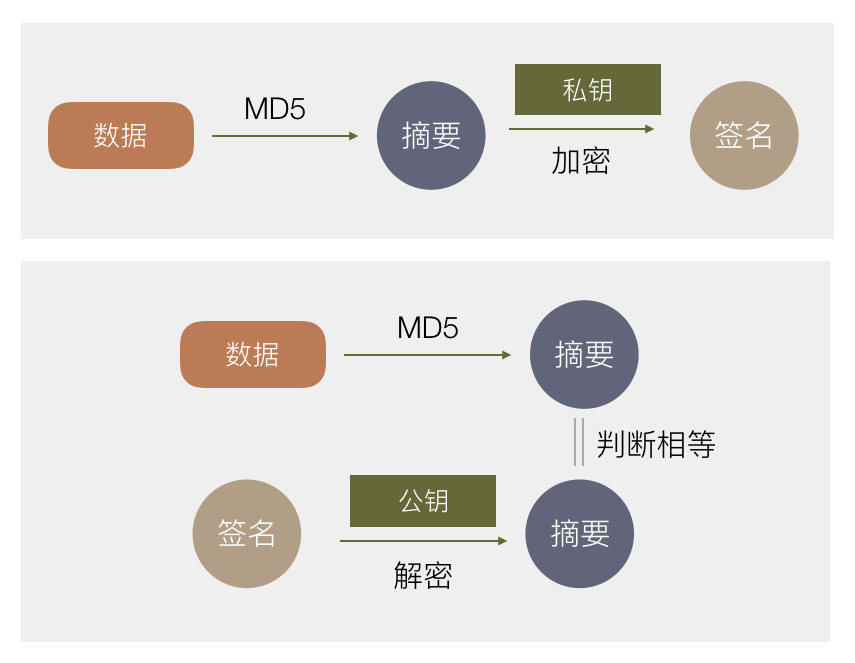
上述的 (n,e) 这两个数据在一起就是公钥,(n,d) 这两个数据就是私钥,满足用公钥加密,私钥解密,或反过来公钥加密,私钥解密,也满足在只暴露公钥(只知道 n 和 e)的情况下,要推导出私钥 (n,d) ,需要把大整数 n 因数分解。目前因数分解只能靠暴力穷举,而n数字越大,越难以用穷举计算出因数 p 和 q ,也就越安全,当 n 大到二进制 1024 位或 2048 位时,以目前技术要破解几乎不可能,所以非常安全。 若对数字 d 是怎样计算出来的感兴趣,可以详读这两篇文章:RSA 算法原理(一)(二) https://wereadteam.github.io/2017/03/13/Signature/#%E6%95%B0%E5%AD%97%E7%AD%BE%E5%90%8D数字签名 现在知道了有非对称加密这东西,那数字签名是怎么回事呢? 数字签名的作用是我对某一份数据打个标记,表示我认可了这份数据(签了个名),然后我发送给其他人,其他人可以知道这份数据是经过我认证的,数据没有被篡改过。 有了上述非对称加密算法,就可以实现这个需求:

首先用一种算法,算出原始数据的摘要。需满足 a.若原始数据有任何变化,计算出来的摘要值都会变化。 b.摘要要够短。这里最常用的算法是MD5。 生成一份非对称加密的公钥和私钥,私钥我自己拿着,公钥公布出去。 对一份数据,算出摘要后,用私钥加密这个摘要,得到一份加密后的数据,称为原始数据的签名。把它跟原始数据一起发送给用户。 用户收到数据和签名后,用公钥解密得到摘要。同时用户用同样的算法计算原始数据的摘要,对比这里计算出来的摘要和用公钥解密签名得到的摘要是否相等,若相等则表示这份数据中途没有被篡改过,因为如果篡改过,摘要会变化。
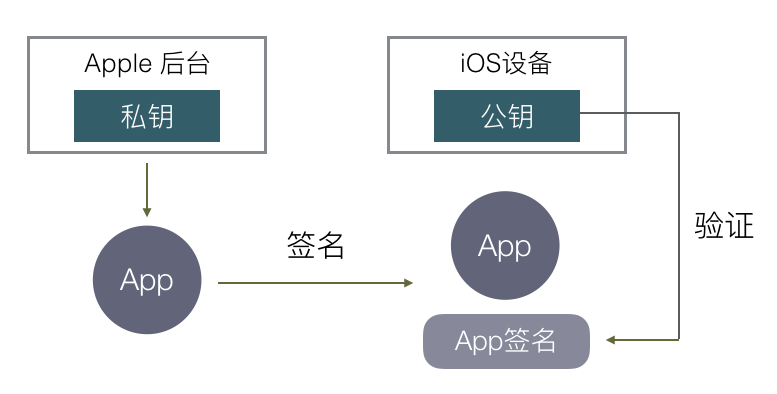
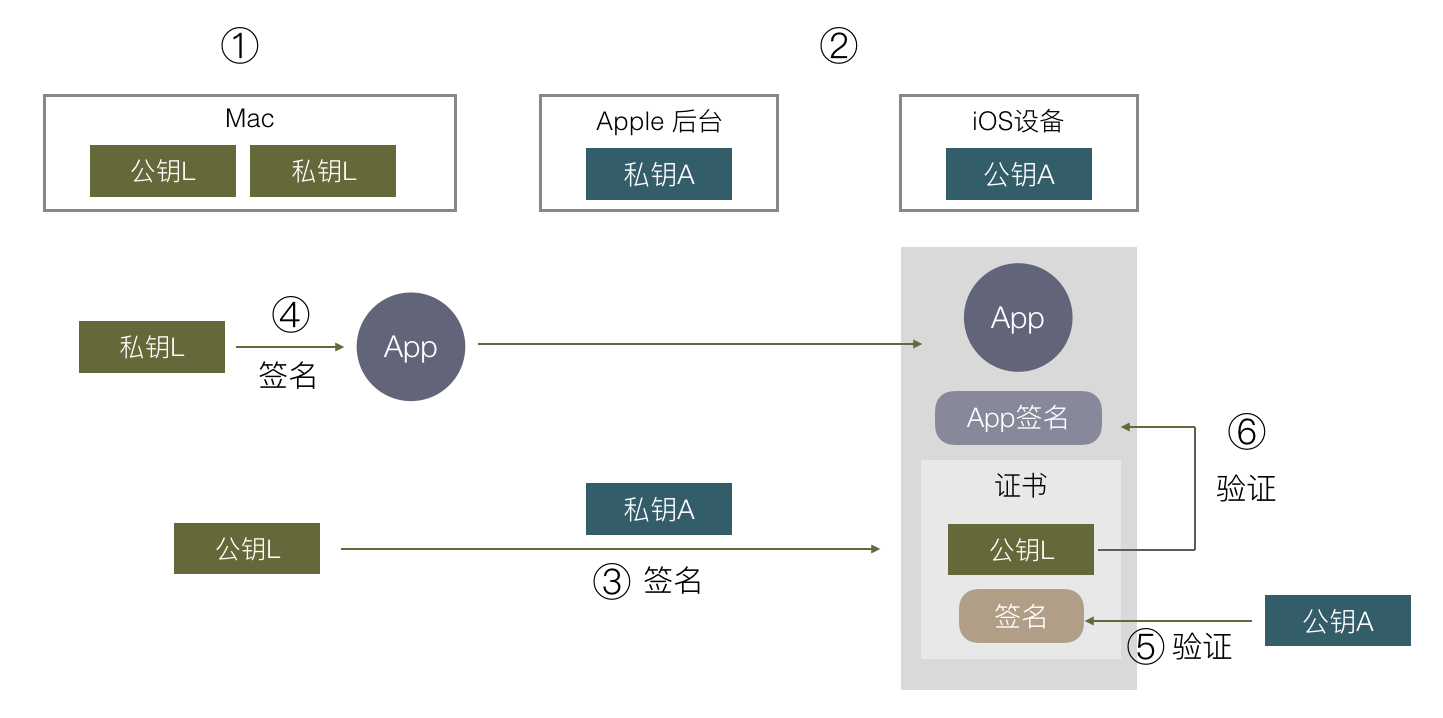
之所以要有第一步计算摘要,是因为非对称加密的原理限制可加密的内容不能太大(不能大于上述 n 的位数,也就是一般不能大于 1024 位/ 2048 位),于是若要对任意大的数据签名,就需要改成对它的特征值签名,效果是一样的。 好了,有了非对称加密的基础,知道了数字签名是什么,怎样可以保证一份数据是经过某个地方认证的,来看看怎样通过数字签名的机制保证每一个安装到 iOS 上的 APP 都是经过苹果认证允许的。 https://wereadteam.github.io/2017/03/13/Signature/#%E6%9C%80%E7%AE%80%E5%8D%95%E7%9A%84%E7%AD%BE%E5%90%8D最简单的签名 要实现这个需求很简单,最直接的方式,苹果官方生成一对公私钥,在 iOS 里内置一个公钥,私钥由苹果后台保存,我们传 App 上 AppStore 时,苹果后台用私钥对 APP 数据进行签名,iOS 系统下载这个 APP 后,用公钥验证这个签名,若签名正确,这个 APP 肯定是由苹果后台认证的,并且没有被修改过,也就达到了苹果的需求:保证安装的每一个 APP 都是经过苹果官方允许的。

如果我们 iOS 设备安装 APP 只有从 AppStore 下载这一种方式的话,这件事就结束了,没有任何复杂的东西,只有一个数字签名,非常简单地解决问题。 但实际上因为除了从 AppStore 下载,我们还可以有三种方式安装一个 App: 开发 App 时可以直接把开发中的应用安装进手机进行调试。 In-House 企业内部分发,可以直接安装企业证书签名后的 APP。 AD-Hoc 相当于企业分发的限制版,限制安装设备数量,较少用。

苹果要对用这三种方式安装的 App 进行控制,就有了新的需求,无法像上面这样简单了。 https://wereadteam.github.io/2017/03/13/Signature/#%E6%96%B0%E7%9A%84%E9%9C%80%E6%B1%82新的需求 我们先来看第一个,开发时安装APP,它有两个个需求: 安装包不需要传到苹果服务器,可以直接安装到手机上。如果你编译一个 APP 到手机前要先传到苹果服务器签名,这显然是不能接受的。 苹果必须对这里的安装有控制权,包括a.经过苹果允许才可以这样安装。b.不能被滥用导致非开发app也能被安装。

为了实现这些需求,iOS 签名的复杂度也就开始增加了。 苹果这里给出的方案是使用了双层签名,会比较绕,流程大概是这样的:

在你的 Mac 开发机器生成一对公私钥,这里称为公钥L,私钥L。L:Local 苹果自己有固定的一对公私钥,跟上面 AppStore 例子一样,私钥在苹果后台,公钥在每个 iOS 设备上。这里称为公钥A,私钥A。A:Apple 把公钥 L 传到苹果后台,用苹果后台里的私钥 A 去签名公钥 L。得到一份数据包含了公钥 L 以及其签名,把这份数据称为证书。 在开发时,编译完一个 APP 后,用本地的私钥 L 对这个 APP 进行签名,同时把第三步得到的证书一起打包进 APP 里,安装到手机上。 在安装时,iOS 系统取得证书,通过系统内置的公钥 A,去验证证书的数字签名是否正确。 验证证书后确保了公钥 L 是苹果认证过的,再用公钥 L 去验证 APP 的签名,这里就间接验证了这个 APP 安装行为是否经过苹果官方允许。(这里只验证安装行为,不验证APP 是否被改动,因为开发阶段 APP 内容总是不断变化的,苹果不需要管。)

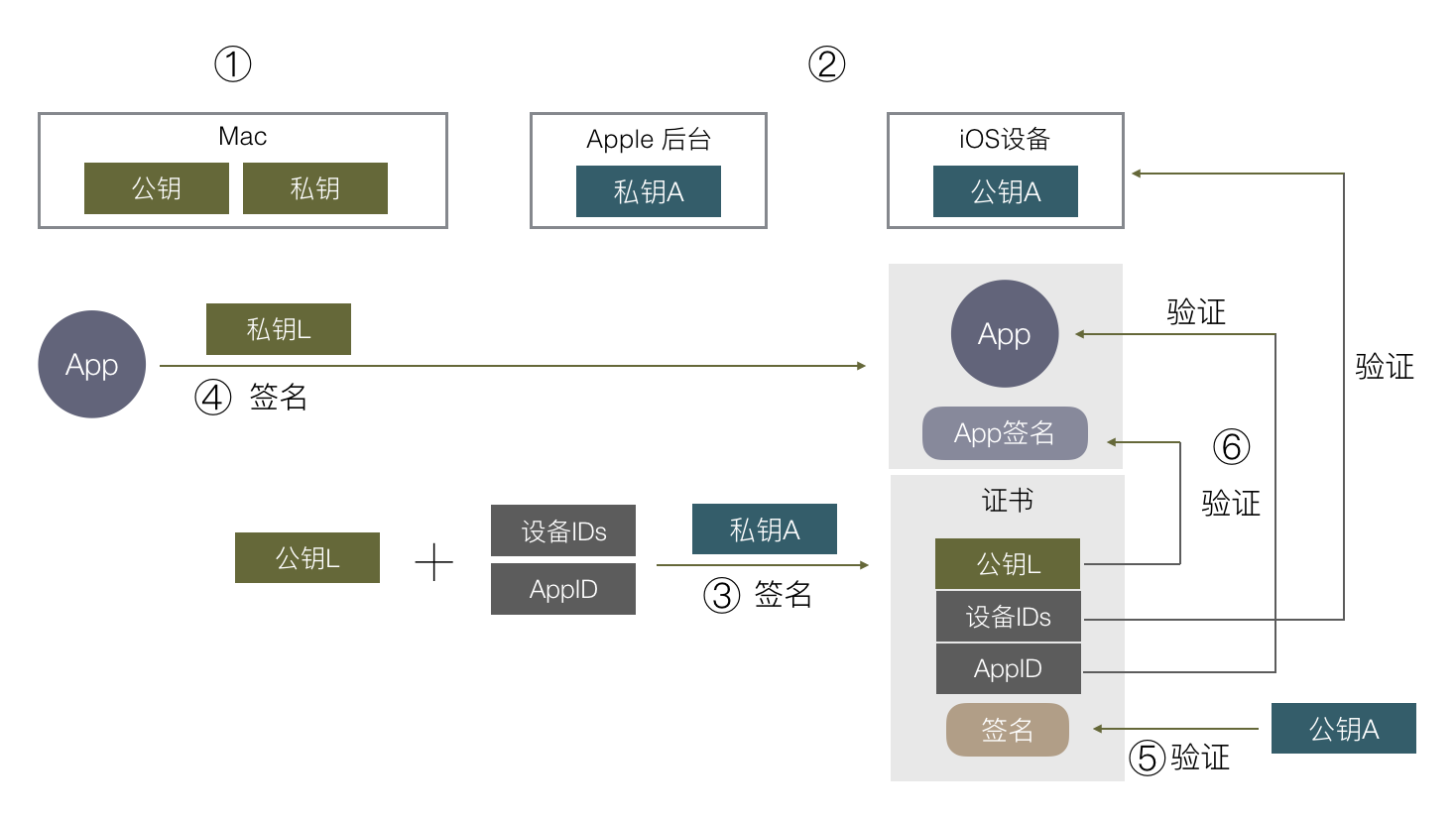
https://wereadteam.github.io/2017/03/13/Signature/#%E5%8A%A0%E7%82%B9%E4%B8%9C%E8%A5%BF加点东西 上述流程只解决了上面第一个需求,也就是需要经过苹果允许才可以安装,还未解决第二个避免被滥用的问题。怎么解决呢?苹果再加了两个限制,一是限制在苹果后台注册过的设备才可以安装,二是限制签名只能针对某一个具体的 APP。 怎么加的?在上述第三步,苹果用私钥 A 签名我们本地公钥 L 时,实际上除了签名公钥 L,还可以加上无限多数据,这些数据都可以保证是经过苹果官方认证的,不会有被篡改的可能。

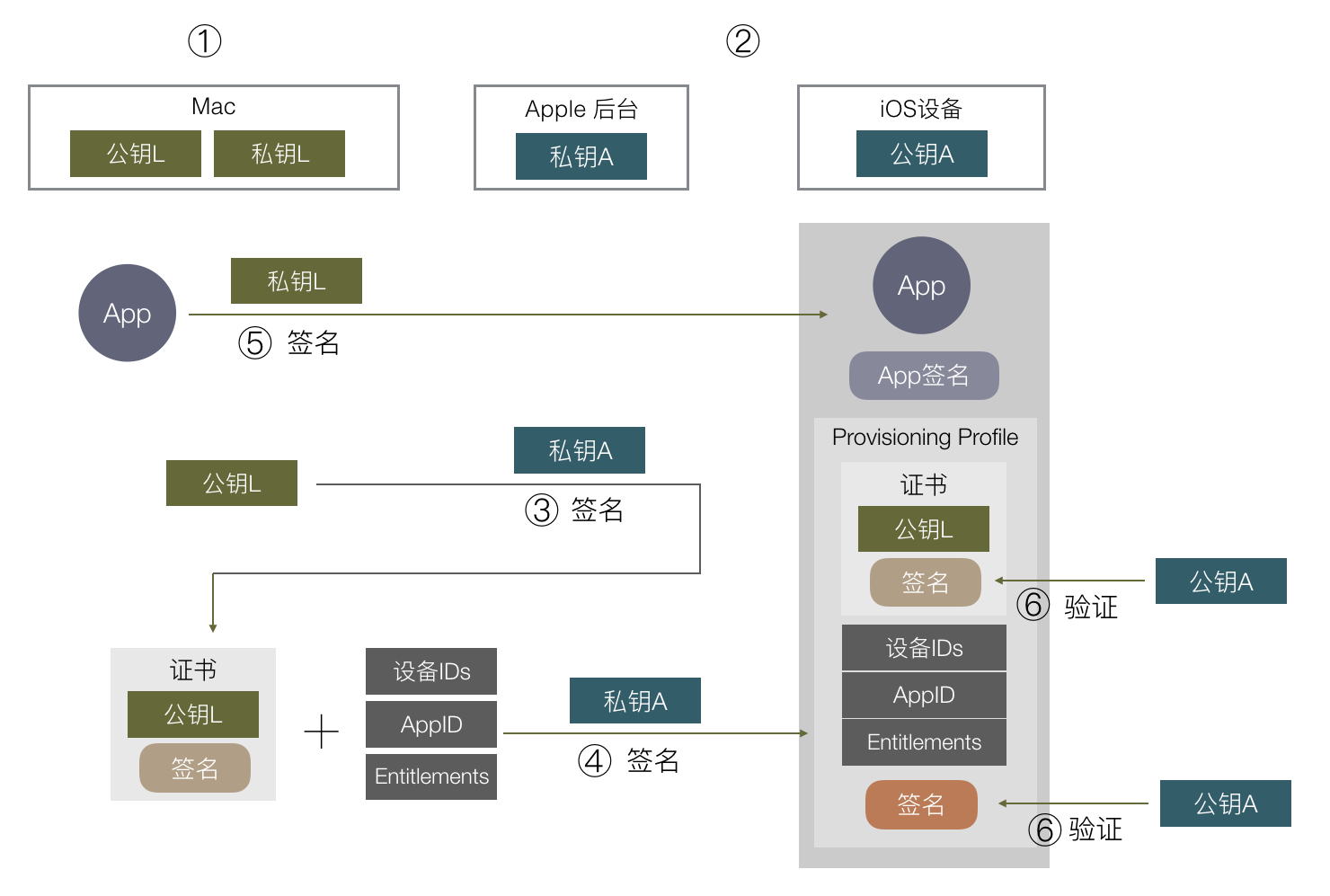
可以想到把 允许安装的设备 ID 列表 和 App对应的 AppID 等数据,都在第三步这里跟公钥L一起组成证书,再用苹果私钥 A 对这个证书签名。在最后第 5 步验证时就可以拿到设备 ID 列表,判断当前设备是否符合要求。根据数字签名的原理,只要数字签名通过验证,第 5 步这里的设备 IDs / AppID / 公钥 L 就都是经过苹果认证的,无法被修改,苹果就可以限制可安装的设备和 APP,避免滥用。 https://wereadteam.github.io/2017/03/13/Signature/#%E6%9C%80%E7%BB%88%E6%B5%81%E7%A8%8B最终流程 到这里这个证书已经变得很复杂了,有很多额外信息,实际上除了 设备 ID / AppID,还有其他信息也需要在这里用苹果签名,像这个 APP 里 iCloud / push / 后台运行 等权限苹果都想控制,苹果把这些权限开关统一称为 Entitlements,它也需要通过签名去授权。 实际上一个“证书”本来就有规定的格式规范,上面我们把各种额外信息塞入证书里是不合适的,于是苹果另外搞了个东西,叫 Provisioning Profile,一个 Provisioning Profile 里就包含了证书以及上述提到的所有额外信息,以及所有信息的签名。 所以整个流程稍微变一下,就变成这样了:
因为步骤有小变动,这里我们不辞啰嗦重新再列一遍整个流程: 在你的 Mac 开发机器生成一对公私钥,这里称为公钥L,私钥L。L:Local 苹果自己有固定的一对公私钥,跟上面 AppStore 例子一样,私钥在苹果后台,公钥在每个 iOS 设备上。这里称为公钥A,私钥A。A:Apple 把公钥 L 传到苹果后台,用苹果后台里的私钥 A 去签名公钥 L。得到一份数据包含了公钥 L 以及其签名,把这份数据称为证书。 在苹果后台申请 AppID,配置好设备 ID 列表和 APP 可使用的权限,再加上第③步的证书,组成的数据用私钥 A 签名,把数据和签名一起组成一个 Provisioning Profile 文件,下载到本地 Mac 开发机。 在开发时,编译完一个 APP 后,用本地的私钥 L 对这个 APP 进行签名,同时把第④步得到的 Provisioning Profile 文件打包进 APP 里,文件名为 embedded.mobileprovision ,把 APP 安装到手机上。 在安装时,iOS 系统取得证书,通过系统内置的公钥 A,去验证 embedded.mobileprovision 的数字签名是否正确,里面的证书签名也会再验一遍。 确保了 embedded.mobileprovision 里的数据都是苹果授权以后,就可以取出里面的数据,做各种验证,包括用公钥 L 验证APP签名,验证设备 ID 是否在 ID 列表上,AppID 是否对应得上,权限开关是否跟 APP 里的 Entitlements 对应等。

开发者证书从签名到认证最终苹果采用的流程大致是这样,还有一些细节像证书有效期/证书类型等就不细说了。 https://wereadteam.github.io/2017/03/13/Signature/#%E6%A6%82%E5%BF%B5%E5%92%8C%E6%93%8D%E4%BD%9C概念和操作 上面的步骤对应到我们平常具体的操作和概念是这样的: 第 1 步对应的是 keychain 里的 “从证书颁发机构请求证书”,这里就本地生成了一堆公私钥,保存的 CertificateSigningRequest 就是公钥,私钥保存在本地电脑里。 第 2 步苹果处理,不用管。 第 3 步对应把 CertificateSigningRequest 传到苹果后台生成证书,并下载到本地。这时本地有两个证书,一个是第 1 步生成的,一个是这里下载回来的,keychain 会把这两个证书关联起来,因为他们公私钥是对应的,在XCode选择下载回来的证书时,实际上会找到 keychain 里对应的私钥去签名。这里私钥只有生成它的这台 Mac 有,如果别的 Mac 也要编译签名这个 App 怎么办?答案是把私钥导出给其他 Mac 用,在 keychain 里导出私钥,就会存成 .p12 文件,其他 Mac 打开后就导入了这个私钥。 第 4 步都是在苹果网站上操作,配置 AppID / 权限 / 设备等,最后下载 Provisioning Profile 文件。 第 5 步 XCode 会通过第 3 步下载回来的证书(存着公钥),在本地找到对应的私钥(第一步生成的),用本地私钥去签名 App,并把 Provisioning Profile 文件命名为 embedded.mobileprovision 一起打包进去。这里对 App 的签名数据保存分两部分,Mach-O 可执行文件会把签名直接写入这个文件里,其他资源文件则会保存在 _CodeSignature 目录下。

第 6 - 7 步的打包和验证都是 Xcode 和 iOS 系统自动做的事。 这里再总结一下这些概念: 证书:内容是公钥或私钥,由其他机构对其签名组成的数据包。 Entitlements:包含了 App 权限开关列表。 CertificateSigningRequest:本地公钥。 p12:本地私钥,可以导入到其他电脑。 Provisioning Profile:包含了 证书 / Entitlements 等数据,并由苹果后台私钥签名的数据包。

https://wereadteam.github.io/2017/03/13/Signature/#%E5%85%B6%E4%BB%96%E5%8F%91%E5%B8%83%E6%96%B9%E5%BC%8F其他发布方式 前面以开发包为例子说了签名和验证的流程,另外两种方式 In-House 企业签名和 AD-Hoc 流程也是差不多的,只是企业签名不限制安装的设备数,另外需要用户在 iOS 系统设置上手动点击信任这个企业才能通过验证。 而 AppStore 的签名验证方式有些不一样,前面我们说到最简单的签名方式,苹果在后台直接用私钥签名 App 就可以了,实际上苹果确实是这样做的,如果去下载一个 AppStore 的安装包,会发现它里面是没有 embedded.mobileprovision 文件的,也就是它安装和启动的流程是不依赖这个文件,验证流程也就跟上述几种类型不一样了。 据猜测,因为上传到 AppStore 的包苹果会重新对内容加密,原来的本地私钥签名就没有用了,需要重新签名,从 AppStore 下载的包苹果也并不打算控制它的有效期,不需要内置一个 embedded.mobileprovision 去做校验,直接在苹果用后台的私钥重新签名,iOS 安装时用本地公钥验证 App 签名就可以了。 那为什么发布 AppStore 的包还是要跟开发版一样搞各种证书和 Provisioning Profile?猜测因为苹果想做统一管理,Provisioning Profile 里包含一些权限控制,AppID 的检验等,苹果不想在上传 AppStore 包时重新用另一种协议做一遍这些验证,就不如统一把这部分放在 Provisioning Profile 里,上传 AppStore 时只要用同样的流程验证这个 Provisioning Profile 是否合法就可以了。 所以 App 上传到 AppStore 后,就跟你的 证书 / Provisioning Profile 都没有关系了,无论他们是否过期或被废除,都不会影响 AppStore 上的安装包。 到这里 iOS 签名机制的原理和主流程大致说完了,希望能对理解苹果签名和排查日常签名问题有所帮助。 https://wereadteam.github.io/2017/03/13/Signature/#P-S-%E4%B8%80%E4%BA%9B%E7%96%91%E9%97%AEP.S.一些疑问 最后这里再提一下我关于签名流程的一些的疑问。 https://wereadteam.github.io/2017/03/13/Signature/#%E4%BC%81%E4%B8%9A%E8%AF%81%E4%B9%A6企业证书 企业证书签名因为限制少,在国内被广泛用于测试和盗版,fir.im / 蒲公英等测试平台都是通过企业证书分发,国内一些市场像 PP 助手,爱思助手,一部分安装手段也是通过企业证书重签名。通过企业证书签名安装的 App,启动时都会验证证书的有效期,并且不定期请求苹果服务器看证书是否被吊销,若已过期或被吊销,就会无法启动 App。对于这种助手的盗版安装手段,苹果想打击只能一个个吊销企业证书,并没有太好的办法。 这里我的疑问是,苹果做了那么多签名和验证机制去限制在 iOS 安装 App,为什么又要出这样一个限制很少的方式让盗版钻空子呢?若真的是企业用途不适合上 AppStore,也完全可以在 AppStore 开辟一个小的私密版块,还是通过 AppStore 去安装,就不会有这个问题了。 https://wereadteam.github.io/2017/03/13/Signature/#AppStore-%E5%8A%A0%E5%AF%86AppStore 加密 另一个问题是我们把 App 传上 AppStore 后,苹果会对 App 进行加密,导致 App 体积增大不少,这个加密实际上是没卵用的,只是让破解的人要多做一个步骤,运行 App 去内存 dump 出可执行文件而已,无论怎样加密,都可以用这种方式拿出加密前的可执行文件。所以为什么要做这样的加密呢?想不到有什么好处。 https://wereadteam.github.io/2017/03/13/Signature/#%E6%9C%AC%E5%9C%B0%E7%A7%81%E9%92%A5本地私钥 我们看到前面说的签名流程很绕很复杂,经常出现各种问题,像有 Provisioning Profile 文件但证书又不对,本地有公钥证书没对应私钥等情况,不理解原理的情况下会被绕晕,我的疑问是,这里为什么不能简化呢?还是以开发证书为例,为什么一定要用本地 Mac 生成的私钥去签名?苹果要的只是本地签名,私钥不一定是要本地生成的,苹果也可以自己生成一对公私钥给我们,放在 Provisioning Profile 里,我们用里面的私钥去加密就行了,这样就不会有 CertificateSigningRequest 和 p12 的概念,跟本地 keychain 没有关系,不需要关心证书,只要有 Provisioning Profile 就能签名,流程会减少,易用性会提高很多,同时苹果想要的控制一点都不会少,也没有什么安全问题,为什么不这样设计呢? 能想到的一个原因是 Provisioning Profile 在非 AppStore 安装时会打包进安装包,第三方拿到这个 Provisioning Profile 文件就能直接用起来给他自己的 App 签名了。但这种问题也挺好解决,只需要打包时去掉文件里的私钥就行了,所以仍不明白为什么这样设计。

shell命令用正则批量重命名文件

又是用shell来操作文件的问题.

我下了老友记的全集, 结果在NAS里死活匹配不出3季以后的剧集信息, 因为打包来源相同, 一直没深究, 只当是刮削工具做得不好, 今天才发现从第4季开始, 所有的文件名格式都错了, 如:

Friends.s10.06.2003.BDRip.1080p.Ukr.Eng.AC3.Hurtom.TNU.Tenax555.mkv

中的s10.06应为s10.e06, 那么改对不就是了么. 又是批量任务啊, 这次的需求从上次的批量移动文件变成了批量修改文件名.

事实上mv其实也是重命名工具, 奈何这次的规则稍微复杂, 我还是想要用正则来匹配, 一番搜索, 找到了rename这个工具. 网上的相关文章似乎有点旧, 跟今天我Homebrew下来的的文档有出入, 因此也就没看网上的文档了, 建议自己看一下官方文档, 还自带了tutorialcookbook, 很良心啊, 看完基本自己就会了.

新版的rename工具把选项分为了switchtransforms, 自然文档也就成了:

rename [switches|transforms] [files]

既然都推荐你们看文档了, 我了不一一介绍了, 挑几个需要注意的讲, 最后再揭晓我是如何完成这次批量重命名的.

##debug -n这个switch可以显示本次命令将被如何执行, 而不真正执行, 这非常像上一篇文章里介绍xargs时的-p, 在rename的语境里, 它叫dry-run. 总之我就是通过这个学习的, 非常有用.

##替换 新版rename加了很多像去头啊, 去尾啊, 加前缀啊, 加尾缀啊, 去空白啊, 变大小写啊等等的选项, 这个去读文档, 执行一些简单且明确的任务用这些switchtransforms比自己去构建正则要来的简单, 这也是作者把这些小功能全提取出来的目的吧. 由于我的目标是正则, 着重关注-s这个transform.

假设有文件abc123.mp3abc456.mp3, 以下命令均加了-n, 以便直接看输出

#替换
$rename -n -s abc mmm *
$rename -n 's/abc/mmm/' *
#以上两句只是展示两种写法/格式
#输出:
'abc123.mp3' would be renamed to 'mmm123.mp3'
'abc456.mp3' would be renamed to 'mmm456.mp3'

#加前缀
$rename -n 's/^/album_/' *.mp3
#输出:
'abc123.mp3' would be renamed to 'album_abc123.mp3'
'abc456.mp3' would be renamed to 'album_abc456.mp3'

#演示一次错误的加前缀方式
$rename -n 's/^/album_^/' *.mp3
#输出:
'abc123.mp3' would be renamed to 'album_^abc123.mp3'
'abc456.mp3' would be renamed to 'album_^abc456.mp3'
#看到了吧? 直接把^给替换了, 而不是插入

#去后缀
$rename -n 's/\.mp3//' *.mp3
#输出:
'abc123.mp3' would be renamed to 'abc123'
'abc456.mp3' would be renamed to 'abc456'

#分组
$touch AA.S01.12.mkv AA.S01.13.mkv AA.S01.14.mkv
#这次把文件搞复杂点, 假定有如上三个文件, 我们要把12改为E12, 以此类推
$rename -n 's/\.(\d{2})\./\.E$1\./' *.mkv
#输出:
'AA.S01.12.mkv' would be renamed to 'AA.S01.E12.mkv'
'AA.S01.13.mkv' would be renamed to 'AA.S01.E13.mkv'
'AA.S01.14.mkv' would be renamed to 'AA.S01.E14.mkv'

看到最后一个例子是不是发现我的目标已经达到了? 我没有深入研究, 只是简单的根据实际情况把前后带点符号, 中间夹了两位数字的提取了出来, 加了字母E, 可能还有更简便的办法, 但我看到输出, 就急急测试去了, 果然等待数秒后, 文件全部重命名成功.

##递归 当然没那么简单, 因为4-10季的内容在各自的文件夹里, 如何递归呢? 看过我上一篇文章的人可能会想到我又去借管道和xargs了吧? 这次得益于我提前读了文档, 里面也有介绍, 它还能直接应用find过来的结果, 还不需要像xargs一样给个占位, 应该是作者直接做的支持, 所以我的最终命令是这样的:

$find . -name "*.mkv" -print0 | rename -n 's/\.(\d{2})\./\.e$1\./'

是的, 肯定要先-n看看有没有操作失误, 文件出问题就麻烦了(建议先复制一份).

此外, 因为用的是管道, 所以最后的[files]参数就不需要了, 我之前就是疏忽了, 复制过来时留着前面做测试的*.mkv尾巴, 看到出错提示才意识到.

2021/4/22 我又来批量重命名的时候,发现-print0加上反而不行了,也就是说把带了换行符的find输出直接送到rename 里面,反而能成功,拼成一行送进去的不行,不知道上次是怎么成功的。

so far so good.

##吐槽 简书的代码块, 预览里很好看, 发布出去千奇百怪, 是什么鬼, 为了给代码着色, 我不得不在代码语言标识上乱写一通(反正写bash是不着色的)


Bonus

不小心看到关于mv这个技巧, 如果改动的只是文件名的一小部分, 比如在10前面加个e变成e10, 这么做就可以了

mv Friends.s06.{,e}10.1080p.x265.mkv

而不需要

mv Friends.s06.10.1080p.x265.mkv Friends.s06.e10.1080p.x265.mkv

原文里面有两个例子, 一目了然

mv foo-bar-{baz,quux}.txt
mv foo-bar{,-baz}.txt

以上显示的是更改和添加, 显然,你也可以猜到删除的用法, 看起来跟rename用法类似

mv foo-bar{-baz,}.txt

当然这个贴子有很大的争论, 感兴趣可以看看.

ES6中generator传参与返回值

先看两个例子,

1,

function* f() {
  for(var i=0; true; i++) {
    var reset = yield i;
    if(reset) { i = -1; }
  }
}

var g = f();

document.write(g.next().value) // { value: 0, done: false }
document.write(g.next().value) // { value: 1, done: false }
document.write(g.next(true).value) // { value: 0, done: false }

2,

function* gen(x){
  try {
    var y = yield x + 2;
  } catch (e){ 
    document.write(e);
  }
  return y;
}

var g = gen(1);
g.next();
g.throw('出错了');

有什么区别? 第一个里传入了一个true参数, 第二个里传入了一个1参数, 目的都是期望传递给generator. 但例一演示的参数, 传过去是传给了yield语句本身的返回值, 即reset, 也就是说, 如果你没有传参, 每一次next方法, reset获取的结果都是undefined 例二中, 方法本身就有入参, 所以千万不要搞错了, 这种入参等于是一个种子, 所以只需要在实例化这个生成器的时候才需要传.

区别就在是在生成器里传, 还是在生成器的next方法里传. 前者是给生成器赋种子值, 后者是给每个yield赋返回值

SwiftUI的ViewModifier和Animation学习笔记

我们通过这篇文章练习如下几个知识点,借用的是斯坦福CS193p的课程里的demo,但是代码是我写的,也就是对着最终的效果写出我的实现的意思

ViewModifier

首先,我们的卡片分为正面和背面,背面是纯色很简单,正面有一个圆环,和一张图片(实际是emoji,也就是String),我们用ZStack布局好后即可:

ZStack {
            Group {
                RoundedRectangle(cornerRadius: 10.0).fill(Color.white)
                RoundedRectangle(cornerRadius: 10.0).stroke(lineWidth: 3.0)
    				CountDownCircle()  // 卡片内容1
    				Text(card.content) // 卡片内容2
            }.opacity(isFaceUp ? 1.0 : 0.0)
                RoundedRectangle(cornerRadius: 10.0)
                    .opacity(isFaceUp ? 0.0 : 1.0)
        }

所以其实卡片内容就是emoji和圆环,因此我们就想,可不可以在我绘制好这两个内容后,调用一个通用方法就能把它变成一张卡片呢?

ViewModifier就是干这个的,使用语法如同:myView.modifier(Cardify(isFaceUp:)) 提取出来的modifier如下:

struct Cardify: ViewModifier {
    var isFaceUp: Bool

    func body(content: Content) -> some View {
        ZStack {
            Group {
                RoundedRectangle(cornerRadius: 10.0).fill(Color.white)
                RoundedRectangle(cornerRadius: 10.0).stroke(lineWidth: 3.0)
                content  // 正面卡片内容
            }.opacity(isFaceUp ? 1.0 : 0.0)
            RoundedRectangle(cornerRadius: 10.0)
            .opacity(isFaceUp ? 0.0 : 1.0) // 反面卡片内容
    }
}

Extension

更进一步,SwiftUI不是有很多View.font(..).opacity(...)的用法么,其中的fontopacity就是这些modifier,然后扩展(extension)给View的,我们也可以:

extension View {
    func cardify(isFaceUp: Bool) -> some View {
        self.modifier(Cardify(isFaceUp: isFaceUp))
    }
}

很简单的语法,这样最终myView.cardify(isFaceUp:)就能把当前内容给“卡片化”了

Animation

想点击卡片翻面的时候有一个翻页效果,有一个原生的rotation3DEffect方法:

myView.rotation3DEffect(
            .degrees(animatableData),
            axis: (0,1,0)  // 沿Y轴翻转,即水平翻转
            )

实际效果如下:

动画加长了,我们能看清卡片虽然有了翻面的动面,但是在开始动画的一瞬间,卡片的正面就显示出来了,我们来解决这个问题,所以我这里并不是系统讲解动画,而是在对解决问题的思路做个笔记。

题外话,我觉得SwiftUIFlutter诞生时代相同,很多理念也驱同,在动画方面,也是放弃了以前要么从头画起,要么用封装得很好的有限几个动画的思路,基本上让你能用自绘+插值的方式来自己控制动画(有点类似关键帧,但关键帧的帧与帧之间也是自动的),而现在你可以完全对一个过程进行Linear interpolation,来控制动画过程(Flutter中的lerp函数就是干这个的,本节也有SwiftUI的类似实现)。

比如这个翻转,Objective-C里直接就给你实现好了,在SwiftUI里,给的是一个最基本的几何变换,至于这上面的效果,就要你自己实现了。我认为这是对的。

按课程里的思路,卡片要么正面,要么反面,是由isFaceUp决定的,加入动画后,那需要这个属性在进行了50%(也就是90˚)的时候才改值

而这个属性是卡片的属性,与动画无关,所以第一个决策,就是把动画函数写到ViewModifier里面去,传进去的是卡片的属性,但是在modifier里,我们把它适当转化成应该转的角度(0˚或90˚),这样在modifier里面不管做什么变化,都不影响外部调用者自己的语义了(方法和参数都没变):

init(isFaceUp: Bool) {
        // step1 这里接的是布尔值,但是我们需要把它转成对应的翻转角度
        animatableData = isFaceUp ? 0 : 180
    }

    // 重新定义了isFaceUp,改由翻转角度的大小决定
    // 从而解决isFaceUp在第一时间就改变的问题
    var isFaceUp: Bool {
        // step3
        animatableData < 90
    }

剩下的就是语法了,我们要实现一个Animatable的协议,与ViewModifier协议合并成AnimatableModifier,它只有一个属性,用我的话来说,就是前面提到的“动画插值”,我一直用这一个概念来理解这些新库里的动画原理,你也可以有你的理解。

总之,它需要你指定一个提供插值的来源,在这个例子中,这个来源就是rotation3DEffect函数,因为它会自动执行动画,显然里面的“角度”参数是会自己变的,我们要的就是捕捉这个“角度”,组合起来,看代码:

struct Cardify: AnimatableModifier {
    init(isFaceUp: Bool) {
        // step1 把参数转化成动画插值的(最终)值
        animatableData = isFaceUp ? 0 : 180
    }

    var isFaceUp: Bool {
        // step3 通过插值来反推正反面
        animatableData < 90
    }

    // step0
    // 把写死的角度变成插值
    var animatableData: Double // 这个类型是自定义的, 我们要用它来旋转角度,所以是double

    func body(content: Content) -> some View {
        ZStack {
            Group {
                if isFaceUp {
    					// 卡片正面代码                
                } else {
                	   // 卡片反面代码
                }
        // step2
        // 课程里是有额外的角度参数,并且与animatableData进行了绑定
        // 其实为了演示插值的作用,不包装更直观
        .rotation3DEffect(
            .degrees(animatableData),
            axis: (0,1,0)
            )
    }
}

效果如下,其实就是解决了如何捕捉动画进度的问题,也就是animatableData

Animation2

多一个例子,课程里每张卡片翻开就会倒计时,原本是一个大饼,我根据我的喜好改成了圆环(其实是我学教程的习惯,尽可能不去做跟教程一样的事,避免思维惰性)

那么怎么让进度条动起来呢?终于讲到了怎么手动计算插值,并把这组值推给动画库让它动起来的过程了。

有了上一个例子,我查看了一个Shape的定义,原生就conform to protocol Animatable的,所以我们直接添加一个AnimatedData试试。

var animatableData: Double   // degrees

这里跟上例有一点区别,上一例动画是系统库做好的,我们只是capture value,所以几乎只要把那个变量摆在那,别处需要的时候直接使用就可以了,而现在我们是要主动更改这个data,从而实现绘图的不断更新,所以稍微复杂了些。

课程里把起点和终点都做成了动画参数,可能是为了演示AnimatablePair,而本例中起点其实是不变的,所以我实事求是,把它用最简单的方法来实现,同时,放弃对象化思维,使用动画插值的思维,不去考虑插值与原来的类的属性有什么关系,直接把插值用在需要变化的位置,这是做教学的话最直观的方案了,按我的做法,代码几乎没有变化,就多了一行和改了一行:

struct CountDownCircle: Shape {

/* 
以下注释掉的是教程的用法,保留了data与angle的关系
    var endAngle: Angle  //
    var animatableData: Double {
        get {
            endAngle.degrees
        }
        set {
            print("set: \(newValue)")
            endAngle = Angle.degrees(newValue)
        }
*/    
    // 我直观展示这个插值的用法
    var animatableData: Double   // degrees

    func path(in rect: CGRect) -> Path {
        var p = Path()
        let center = CGPoint(x: rect.midX, y: rect.midY)
        p.addArc(center: center,
                 radius: (rect.width-10.0)/2.0,
                 startAngle: Angle.degrees(0-90),
                 endAngle: Angle.degrees(animatableData), //endAngle(教程用endAngle),
                 clockwise: false)
        return p
    }
}

改造很简单,就是把告诉动画库“结束角度”是一个需要变动的值就好了,我们调用的时候把一个能自己变化的值送到这个参数里就能动起来。对调用者进行一点准备:

@State private var animatedData: Double = 0.0

    private func startRemainingCountdown() {
        animatedData = 剩余进度
        withAnimation(.linear(duration: 剩余时间)) {
            animatedData = 0.0
        }
    }

这里做了两件事:

  1. @State的用法,View是无状态的,现在我们要做动画,需要保持一些状态,这里我们保持一个“进度”的值
  2. 添加了一个触发动画的函数,就是设置动画初值,设置终止值,然后通过withAnimation函数让它自动生成插值序列,这就是我前面提过的类似的Flutterlerp方法,SwiftUI中没找到,但是变相提供了用系统动画来提供插值的做法。

使用就很简单了,把“进度”填到相应的参数位,然后选择一个时机触发,我们这里选择的是onAppear

CountDownCircle(animatableData: -animatedData*360-90)
        .stroke(style: strokeStyle).opacity(0.4)
        .onAppear {
            startRemainingCountdown()
        }

需要注意的是withAnimation过程中对值的更改我们并不能显式捕捉,至少我试图把它显示在UI上观察它的变化是失败的,直接显示了最终值,而在接这个变化的插值的底层函数里,我能在animatableDataset方法里看到确实设置了无数的插值,暂时没有理解withAnimation真的有有没有直接对两个数字直接生成一系列中间值

效果如下:

后记

动画我之前写过一篇:用CALayer绘图,添加动画和渐变,很明显可以看到,以前的写法仍然是黑匣子,即告诉动画库,请给我动画,动画的要求是blablabla,而现在都走了插值的路线,即把一系列值告诉你,你按照每个值直接绘图就是了,绘成啥样我自己负责。这就是我这篇文章反复强调的思路的变化,我喜欢这种思路。